Shadow IT isn’t just employees using Dropbox without permission.
It's devices, SaaS tools, cloud accounts, and network configurations that IT has no record of - and the list is longer than most IT managers assume. For MSPs, it's also the client-side version of the same problem: a device an end user brought in during onboarding, a SaaS tool a client's marketing department bought on a credit card, or a network change a former vendor made and never documented.
The problem usually isn't intention. Assets get provisioned faster than they get documented, and the risk only shows up when something breaks, gets breached, or triggers an audit.
This guide walks IT managers - and MSPs managing that same problem across multiple client environments - through what they're actually missing and how to close the gap between what exists and what's recorded.
What Shadow IT Actually Looks Like in 2026
The modern shadow IT problem goes well beyond “unauthorized apps.” It now includes:
- Untracked devices - BYOD laptops, remote work gear.
- Ungoverned SaaS subscriptions purchased by individual departments (or, for MSPs, purchased directly by a client team without looping in IT).
- Cloud accounts opened without IT approval or visibility.
- Undocumented network changes made by vendors or former staff - including changes left behind by a previous MSP or IT contractor.
It’s growing for practical reasons: procurement is faster than ever, remote work expanded the perimeter, and employees now adopt AI tools independently, often before any formal review.
The real cost isn’t hypothetical - it’s security exposure, failed audits, redundant spend, and incidents that take longer to resolve because nobody documents the environment in the first place.
The Root Cause: Discovery Without Documentation
Most IT teams already have discovery tools - RMM platforms, Microsoft Intune, network scanners. Discovery alone doesn’t solve the problem.
A device showing up on a scan is not the same as a documented asset. You still need the owner, the purpose, the configuration, and its relationships to other systems.
The gap between "we found it" and "we understand it" is exactly where shadow IT hides in plain sight. For MSPs, this gap often widens across client environments - an asset might show up in one client's RMM sync but never get tied back to that client's actual documentation, or a technician handing off a ticket has no way to know a device even exists.
Without a central system of record, discovered assets stay invisible in every way that matters operationally - no owner to contact, no context for incidents, no way to know if it’s still in use.
What Undocumented Assets Actually Cost You
The impact of undocumented assets touches five distinct areas of IT operations:
| Impact Area | What Goes Wrong | Why Documentation Fixes It |
|---|---|---|
| Security | Unpatched, unmonitored devices become entry points | You can't protect what isn't recorded as existing |
| Compliance | Incomplete records can create challenges during audits or compliance reviews | A documented record gives auditors something concrete to review, not just paperwork after the fact |
| Spend | Duplicate SaaS licenses and forgotten subscriptions go unnoticed | Centralized records surface redundant and unused spend |
| Incident Response | Undocumented assets mean longer MTTR and more guesswork | A known asset with context resolves faster than one discovered mid-incident |
| Offboarding | Departing employees leave behind access IT never tracked | Documented ownership makes deprovisioning a checklist, not a guess |
None of these costs require a breach to materialize. They compound quietly - in wasted spend, in slower incident response, in an audit that takes three weeks instead of three days.
How IT Portal Brings Undocumented Assets into the Open
Closing the gap between discovery and documentation is exactly what a structured IT documentation platform is built to do. Here’s how each piece fits:
- Device Import and API-Based Device Import: Pull assets directly from your RMM, Microsoft Intune, or network scans into one documented record. Whatever doesn’t match your existing documentation is your shadow IT list.
- Network Import: IT Portal helps teams organize imported device and network data, compare it against existing documentation, and identify gaps that need review.
- Integrations: Native connections with M365, Intune, ConnectWise, NinjaRMM, and more help bring key asset and system information into your documentation process, making gaps easier to identify and review.
- Relationships: Once an asset is documented, map what it connects to. Dependency mapping is critical for both security response and faster incident resolution - especially useful when a technician picks up a ticket for a client environment they didn't originally set up.
- Synopsis View: An instant inventory snapshot per site or company - gaps in documentation become immediately visible, not buried in a spreadsheet.
- Expirations Tracking: Surfaces SaaS renewals and license dates that would otherwise renew invisibly - asset-to-license linking that closes the spend-visibility gap.
- Change History: Every addition or modification is logged automatically, helping support audit preparation and internal review.
IT Portal's hierarchical structure keeps every discovered asset in context - company, site, facility - so "we found it" becomes "we understand it" without extra manual work. For MSPs, that same structure keeps one client's undocumented assets from getting lost in another client's records.
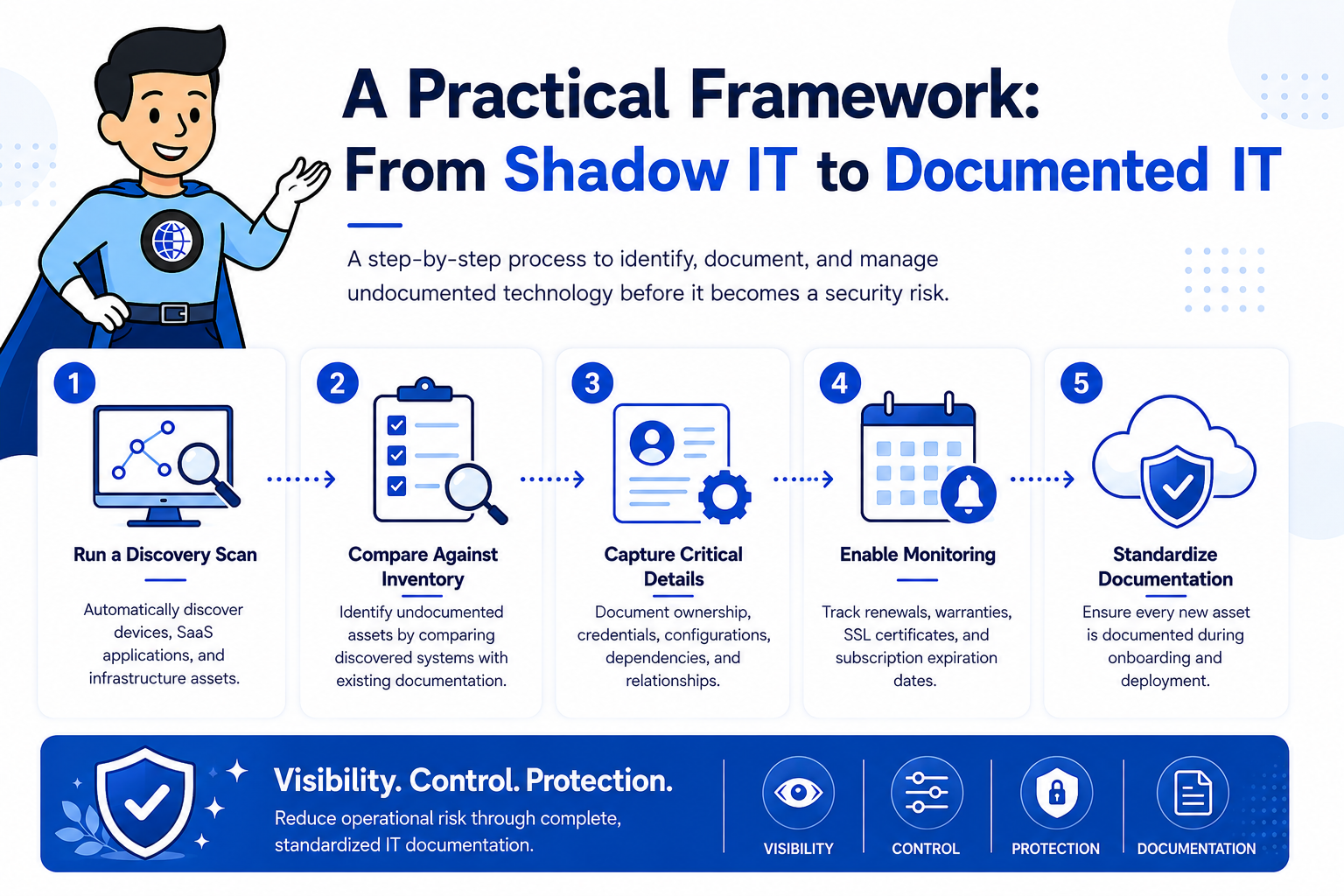
A Practical Framework: From Shadow to Documented
- Run a discovery scan and import results into your documentation platform via device import or API sync.
- Cross-reference discovered assets against your existing documented inventory. The gap is your shadow IT list.
- Capture the essentials for each undocumented asset: owner, purpose, configuration, and relationships.
- Set expiration alerts for SaaS subscriptions and licenses so renewals never happen invisibly again.
- Establish a provisioning policy: any new device, tool, or cloud account gets documented at setup - not discovered months later. For MSPs, this includes a standard onboarding step for every new client: import what exists, flag what doesn't match, and document it before it becomes someone else's mystery ticket.
You Might Also Like
IT Asset Management Software: A Complete Guide
A deeper look at building the documentation layer that makes asset visibility permanent, not just a one-time cleanup.
Shadow IT Is a Process Problem, Not a People Problem
Shadow IT isn't about employees making bad choices. It's what happens when provisioning outpaces documentation, every time, by default. Documentation is the process fix.
IT Portal gives IT managers and MSPs managing that same challenge across every client - the system of record to make discovered assets operationally visible: not just found, but understood - owned, configured, related, and current.
An asset you can't see is an asset you can't secure - visibility starts with documentation, not another scan.
Ready to see what's hiding in your environment?


