Most MSPs land in one of two places: overpaying without realizing it, or underpaying and hitting a capability wall six months in.
The real question isn't "what does it cost?" It's "what am I actually buying, and what's hidden from the sticker price?"
This post breaks down how IT documentation pricing models actually work, what the real total cost looks like at different team sizes, and which terms deserve a second look before you sign.
The Four Pricing Models, Explained Plainly
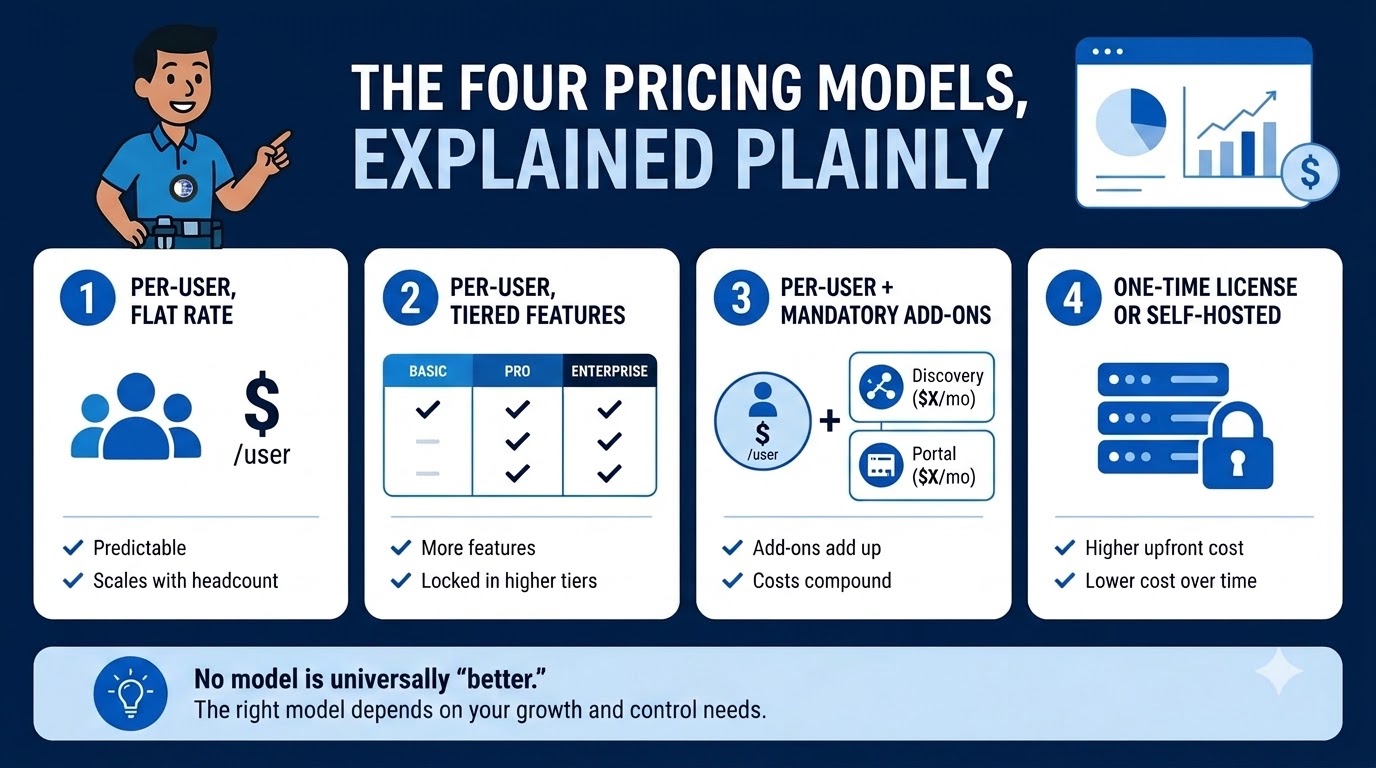
Most comparison posts just line up named vendors side by side. It's more useful to understand the model underneath, because that's what determines your real cost.
Per-user, flat rate:
Predictable, and it scales cleanly with headcount. Good for growing teams - just watch for user minimums that charge you for seats you don't need yet.
Per-user, tiered features:
The base price looks reasonable until you realize the feature you actually need - API access, deeper integrations, AI tools - only lives in the top tier. This is one of the most common traps in the category.
Per-user plus mandatory add-ons:
This is where costs compound. A documentation platform's base per-user price can look very different once network discovery or a client-facing portal are billed separately as their own line items.
One-time license or self-hosted:
Higher upfront investment, lower cost over time. The right fit for MSPs with on-premises requirements, data-sovereignty rules to satisfy, or a preference for owning infrastructure over renting it indefinitely.
None of these models is universally "better" - the right one depends on how fast your team is growing and how much control you need over deployment.
What matters is that you price the model correctly, not just the sticker on the pricing page.
Whatever you're evaluating, calculate total cost of ownership across a full contract term, add-ons included, before comparing it against anything else.
What the Numbers Actually Look Like, by Team Size
Small MSPs (1–5 techs)
User minimums do the most damage here.
IT Glue publishes a five-user floor across its standard tiers, so a three-person shop pays for seats nobody's using - and that's before the one-time onboarding fee, which IT Glue's own FAQ confirms cannot be waived.
Hudu carries no user minimum and no setup fee, according to its published pricing terms. IT Portal's pricing is flat and tiered by user count with no forced floor.
Mid-size MSPs (6–15 techs)
This is where add-ons become the real story.
A 10-technician team on IT Glue's Basic plan at $29/user/month runs $3,480 a year in base licensing alone - before optional add-ons like Network Glue (network discovery) or MyGlue (client-facing portal) enter the picture, each billed as a separate monthly line item.
Add either, and the complete stack can climb well beyond base licensing. Exact totals depend on your current contract and any negotiated terms, so confirm current add-on pricing directly with the vendor before budgeting.
Scaling MSPs (15+ techs)
At this size, contract length matters as much as price.
IT Glue's standard pricing is built on a 36-month term, which can limit flexibility for a team growing from 15 to 25 technicians mid-contract.
Month-to-month or annual billing is worth a small premium if your headcount is still moving.
The Hidden Costs Nobody Prices in Upfront
Onboarding fees
Some platforms charge a mandatory, non-waivable onboarding fee that only appears on invoice one. Budget for this before you sign, not after - and get the exact figure in writing, since these amounts vary by tier and change over time.
Migration costs
Switching platforms later costs real technician time. If exporting your own data is difficult or gated, that's a cost you're deferring, not avoiding.
API access tiers
Some platforms restrict full API access to their top-tier plan.
If you're running RMM/PSA integrations or any automation, verify this before you commit - not after you've built a workflow around it.
Discovery add-ons
Network discovery is frequently billed as a separate line item rather than included in base pricing.
Comparing "base pricing" across vendors without accounting for this is comparing two different products - one that includes discovery and one that doesn't.
Each of these is manageable on its own.
Stacked together across a multi-year contract, they're the difference between the number a vendor quotes you and the number that actually shows up on your invoice.
Pricing Terms MSPs Should Review Carefully
A mandatory onboarding fee on a SaaS product.
Setup help is a reasonable thing to charge for, but ask whether it's optional or a forced charge you can't opt out of - and how much it actually costs before you sign.
A 36-month contract for a documentation platform.
Team size changes. Tool requirements change. A long-term lock-in on what should be a flexible productivity tool is worth weighing against shorter terms available elsewhere in the category.
Per-company discovery fees that compound at scale.
These can compound quickly for MSPs managing dozens of clients, so model the add-on cost at your actual client count, not just the headline per-seat price.
Before You Compare Pricing, Ask This
- What's included in the base price, and what's billed separately?
- Are there user minimums?
- Is onboarding required, and how much does it cost?
- Are contracts month-to-month, annual, or long-term?
- Are discovery, reporting, client access, and API features included, or add-ons?
- Can I see real pricing without booking a sales call?
How to Evaluate Value, Not Just Cost
Before signing anything, ask any vendor three questions:
- What's the full-year cost for my current team size, including every add-on I'd actually use?
- What's the contract term, and what happens if I add or remove users mid-term?
- Is there a user minimum and what do I pay if my team is below it?
The strongest way to frame any comparison: MSPs should evaluate total cost of ownership, not just the monthly user price.
The Bottom Line
IT Portal uses flat and transparent pricing.
No user minimums, no mandatory onboarding fees, and no add-on charges for core platform features like reporting and change history that support audit preparation, or the hierarchical structure that keeps a growing client base organized.
Cloud and on-premises deployments are priced comparably, so the decision comes down to what fits your operation not what your budget can absorb.
If you're mid-evaluation, IT Portal's pricing page shows exactly what you'd pay for your team size.
No sales call required to see a number. For a deeper look at how documentation platforms fit into your broader stack, see IT Portal's solutions for MSPs.
You might also like: MSP Software: The Complete Guide to Tools, Platforms, and Pricing


