The software isn't the problem. The missing documentation layer is.
Most IT asset management tools track what you own. But without structured documentation - the context behind every asset, user, and configuration - you're managing inventory, not infrastructure.
MSPs and IT teams evaluating IT asset management software tend to focus on discovery, tracking, and reporting features.
That's logical. But what truly separates success from disappointment is the strength of the software's documentation foundation.
This post explains the documentation layer, why it's often skipped, and how the right ITAM solution brings asset chaos under control.
What Is IT Asset Management Software?
IT asset management software is a platform that tracks, manages, and optimizes IT assets across their entire lifecycle, from procurement through retirement.
What counts as an IT asset? Hardware, software licenses, cloud subscriptions, SaaS tools, and network devices. Organizations adopt ITAM software for four core reasons:
- Cost control: Eliminate waste from unused licenses and ghost assets.
- Compliance: Meet SOC 2, ISO 27001, HIPAA, and CMMC requirements.
- Visibility: Know what you own, where it lives, and who is using it.
- Security: Prevent unauthorized assets and unpatched vulnerabilities.
But here's what most implementations get wrong from day one : They treat the IT asset management software as the complete solution rather than the engine and skip building the data foundation it needs to run.
The Hidden Gap in Most ITAM Implementations
Most teams focus on the tool and skip the foundation. Within a few months, three predictable symptoms appear:
- Assets exist in the system but not in reality.
Ghost assets, outdated records, decommissioned devices still showing as active, because no one documented what was actually deployed. - Technicians can't find what they need fast enough.
No naming, no mapped relationships, no configuration. Discovery found it, documentation explains it. - Audits become fire drills.
Compliance frameworks like SOC 2 and ISO 27001 require documented evidence, not verbal assurances. Without structured records, every audit is a scramble.
Investing in IT asset management software without a documentation foundation is like building on sand, the structure looks solid until the first storm.
This gap is why strong IT asset tracking software implementations outperform weak ones, even when both teams use the same tool. The software is only as useful as the data it operates on.
What the Documentation Layer Actually Means
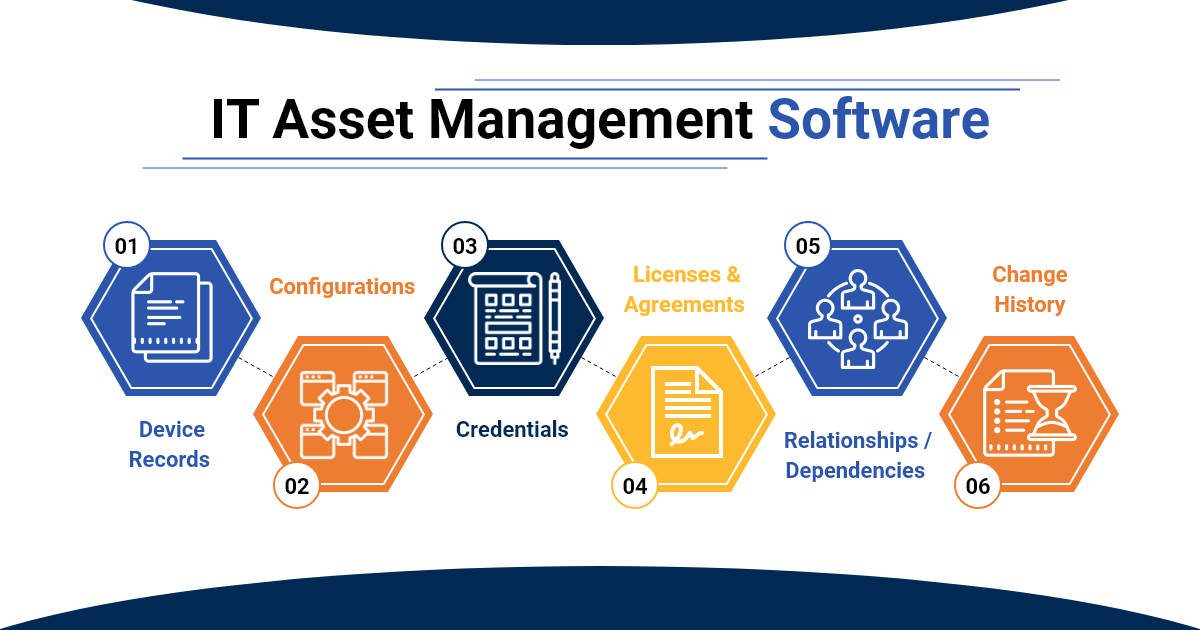
The documentation layer is a centralized system that gives ITAM software its context, not a wiki or spreadsheet, but a purpose-built foundation with six components:
- Device Records: Hardware specs, physical or virtual location, assigned user, purchase date, and warranty expiry.
- Configuration Documentation: Services running, software installed, OS version, network details, and patch status.
- Passwords and Credentials: Securely stored and linked directly to the relevant asset with role-based access control.
- Agreements and Licenses: Software licenses, vendor contracts, and renewal dates linked to the assets they cover.
- Relationships and Dependencies: What connects to what, so you can map downstream impact before acting.
- Change History: Who changed what, when, and why - the audit trail that compliance demands.
Why Teams Skip This Layer
It comes down to three patterns:
- It feels tedious: Documentation tasks have no immediate visible payoff, until an incident or audit makes the cost visible.
- There's no clear ownership: "Everyone's responsibility" reliably becomes no one's responsibility.
- Teams assume the ITAM tool handles it: Discovery populates records. It doesn't give them meaning, relationships, or context. That part is manual or purpose-built.
How Documentation Makes Every ITAM Feature Work Better
Documentation isn't a companion to IT asset management; it's the enabler that determines real value. Here's how it drives five core ITAM use cases:
| ITAM Use Case | Without Documentation | With Documentation |
|---|---|---|
| Asset Discovery | Finds devices, cannot identify or contextualize them | Devices matched instantly to complete, structured records |
| License Compliance | Counts installs, misses renewals and usage context | Licenses linked to agreements, owners, and renewal dates |
| Lifecycle Management | Tracks age only, misses real usage and config history | Full history including config changes and depreciation timelines |
| Incident Response | Identifies affected device, stops there | Immediately surfaces configs, dependencies, and credentials |
| Onboarding New Technicians | Steep learning curve, knowledge locked in people | Documentation tells the complete story from day one |
The pattern is consistent. Without documentation, your IT asset management software tells you what exists. With documentation, it tells you what it means and what to do about it.
The Documentation-First ITAM Framework
Whether you're implementing IT asset management software for the first time or fixing an existing deployment, this five-step framework builds the documentation foundation correctly.
- Establish Naming Conventions: Consistent, human-readable names for every asset type. Without this, discovery tools find devices that no one can identify or manage confidently.
- Build a Hierarchical Documentation Structure: Organize by company → site → facility → device to keep growing environments easy to navigate.
- Document Before You Deploy: No asset goes live undocumented. Make documentation part of the deployment checklist, not a cleanup task after go-live.
- Link Everything: Devices link to configurations. Configurations link to credentials and passwords link to agreements.
- Keep It Alive: Documentation isn't a one-time task. Every change, deployment, or decommission requires an update before closure.
What to Look for in IT Asset Management Software That Supports Documentation
Most IT asset management tools lead with discovery, dashboards, and reporting, which is important, but documentation should be your priority.
Structure & Foundation
- Hierarchical documentation that mirrors your actual IT environment.
- Relationship mapping between assets, users, and applications.
- Audit-ready records with full change history.
Security & Compliance
- Role-based access controls at granular levels.
- Automated compliance documentation.
- Security posture tracking linked to assets.
Integration & Automation
- Native connections to RMM, PSA, and monitoring tools.
- Automated data sync to reduce manual entry.
- API access for custom workflows.
Scalability & Performance
- Handles complex multi-tenant environments.
- Grows with your organization without performance degradation.
- Supports both cloud and on-premises deployments.
IT Portal was built specifically around these requirements. Its hierarchical structure organizes environments from company level down to individual devices. Asset-to-license linking connects every software asset to its agreement and renewal date. Audit-ready reporting means compliance evidence is always current, not assembled at the last minute.
Explore the IT Portal documentation platform to see how these capabilities work in practice.
Why This Matters Most for MSPs
For MSPs, documentation gaps don't just create operational inefficiency, they multiply chaos across every client environment simultaneously.
The Problem Without Documentation
- Every client environment is effectively a black box to any technician who didn't build it.
- New team members spend weeks reverse-engineering what should already be recorded.
- Incidents escalate because no one can quickly answer: what does this asset do, what does it connect to, and how do we fix it?
- Client trust erodes when response times suffer from avoidable knowledge gaps.
The Advantage with Documentation
- Any technician can support any client from day one.
The knowledge lives in the platform, not in specific people. - Onboarding new team members is faster.
Structured records replace tribal knowledge. - Escalations drop.
Context is always available. Technicians resolve issues at first contact instead of escalating up the chain. - Audits are clean.
Documentation maintained as an ongoing operational habit means compliance evidence is always ready. - Client trust is stronger.
Your team operates with precision, not guesswork.
This is the exact problem IT Portal was built to solve for MSPs: a centralized, hierarchical, multi-tenant documentation and IT asset management solution that gives every technician the context they need - for any client, at any time.
Common Mistakes That Prove Documentation Was the Problem All Along
These are patterns that appear in nearly every struggling ITAM implementation:
- Buying ITAM software before documenting existing assets.
Discovery finds devices. Documentation tells you what they are. You need both. - Assuming auto-discovery replaces manual documentation.
Discovery populates a record. Documentation gives it meaning: role, owner, dependencies, credentials, and history. - No naming conventions.
Assets named after the person who set them up become unmanageable the moment that person leaves. - Treating documentation as a one-time project.
Stale documentation creates false confidence and is often worse than no documentation at all. - Siloed documentation.
Passwords in one tool, devices in another, licenses in a spreadsheet. No relationships between them means no single source of truth. - No ownership assigned.
When documentation is everyone's job, it becomes no one's job. Assign ownership by role, with a quarterly review cadence.
The Documentation Layer Is a Choice, Not an Afterthought
IT asset management software is powerful. But documentation is what unlocks that power.
The teams that get the most from their ITAM solution aren't the ones with the longest feature list, they're the ones who built the documentation foundation before everything else.
Name it. Document it. Link it. Maintain it. That framework turns an asset tracking tool into a genuine operational advantage across every client, every technician, and every audit.
IT Portal delivers that foundation: structured documentation, license and asset tracking, integrated credential management, and audit-ready reporting, built for MSPs and IT teams.
Investing in the best IT asset management software delivers 10× the ROI when built on a foundation of structured documentation.
Ready to build the documentation layer your IT asset management software needs?
Frequently Asked Questions
ITAM software uses several pricing models:
Per-asset pricing: Charges based on the number of devices or endpoints managed.
Per-user pricing: Charges based on how many technicians need platform access.
Tiered pricing: SMB, mid-market, and enterprise packages with different feature sets.
Free/open-source: Available but requires technical expertise to deploy and maintain.
The hidden cost: Time wasted searching for asset information often exceeds software subscription costs.
ITAM (IT Asset Management) covers everything: hardware, software, cloud resources, and network devices across the complete lifecycle.
SAM (Software Asset Management) focuses only on software: licenses, compliance, SaaS optimization, and vendor contracts.
HAM (Hardware Asset Management) tracks physical devices: laptops, servers, equipment location, warranties, and depreciation.
Most organizations need ITAM because the real value comes from understanding how hardware, software, and services connect.
Yes. Small businesses often benefit most because they lack dedicated IT staff to manually track assets.
Choose ITAM designed for your scale: simple interface, fast deployment, pre-built templates, transparent pricing. Avoid enterprise platforms with unused features.
The key mistake: Assuming software alone solves everything. Small businesses need documentation even more—when your office manager needs warranty info or credentials, proper documentation means 30 seconds instead of 30 minutes.
Quick Start (2-4 weeks): Basic discovery, import records, establish naming conventions, train core team. Functional coverage but incomplete documentation.
Full Deployment (60-90 days): Complete discovery, backfill documentation, integrate with RMM/PSA tools, train all technicians, build proper workflows. Comprehensive coverage with documentation foundations.
Timeline depends on your documentation commitment. Teams treating it as one-time finish fast but struggle for months. Teams building documentation as ongoing discipline see ROI within 30 days.
Spreadsheets break at predictable points: 100+ assets, multiple locations, regular onboarding, or multiple client environments.
What spreadsheets can't do: Enforce consistency, track change history, map relationships, trigger alerts, provide secure credential access, or integrate with RMM/PSA tools.
If you're asking this question, you've felt the pain: technicians searching for instant information, inconsistent naming, scattered credentials, or audit panic.


