Most network discovery tools were built for a single IT team looking after one environment.
They were never built for an MSP juggling 50+ client networks at once and it shows the moment you scale past a handful of accounts.
Here's the catch: many of these tools look multi-tenant. The dashboard has a company selector. Assets show up "per client."
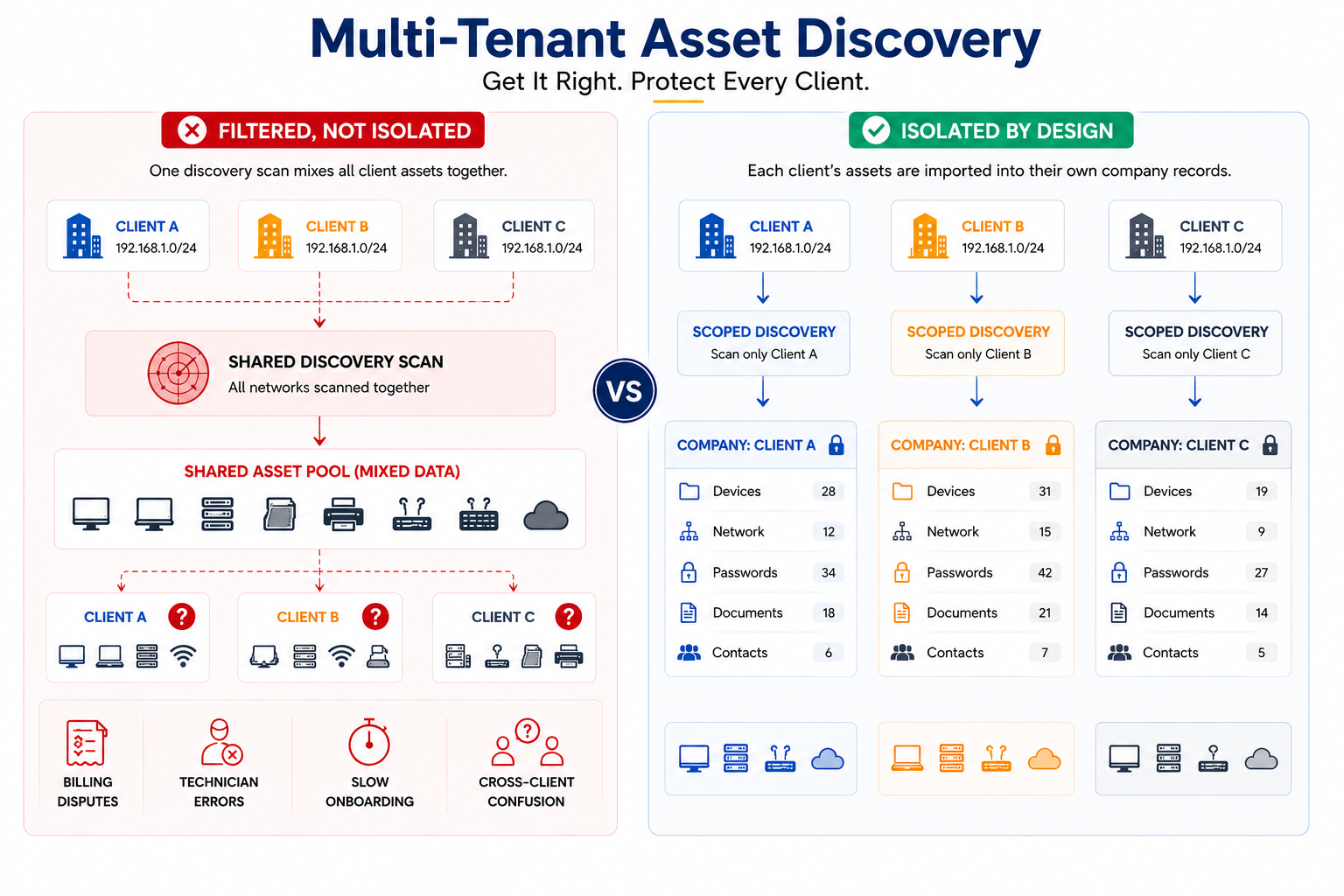
But under the hood, the underlying process often isn't scoped by tenant from the start - data is gathered first, then sorted into client "views" after the fact.
That's a meaningful architectural gap, and it's the one most MSPs don't notice until it shows up as a billing dispute, a misdirected 2 a.m. ticket, or a client onboarding that drags for days.
This piece breaks down what that gap actually looks like, what it costs you operationally, and the questions worth asking any vendor before you trust them with Multi-Tenant Asset Discovery across your whole portfolio.
The Hidden Problem With "Filtered" Discovery
There's a real difference between multi-tenant display and multi-tenant architecture.
Display-layer multi-tenancy sorts after the fact - the platform gathers or imports data in one pass, then sorts results into client "views" once the data already exists in one shared pool.
Architectural multi-tenancy scopes the process itself, before a single device record is created, so data is organized to the client it belongs to from the start.
That distinction matters more than it sounds, because overlapping subnets are the norm across an MSP's book of business, not an edge case.
Plenty of small business networks default to the same private ranges.
Think 192.168.1.0/24, which means a sort-after-the-fact tool has to get right, consistently, which client owns which device on an identical-looking network.
Get that wrong once and you've got two clients' assets tangled together in one record.
Here's how two well-known add-ons handle it today:
When evaluating discovery or documentation add-ons, MSPs should review whether tenant scoping happens at the source (scan or import level) or only at the display/filter level, how overlapping IP ranges are handled, and whether client-level access controls are enforced consistently throughout the workflow. Since pricing, features, and isolation approaches vary by vendor and change over time, it's worth confirming current details directly with each vendor before comparing options.
Neither treats tenant isolation as a non-negotiable part of the architecture.
Both treat it as something you configure and remember to configure correctly, every time, for every client.
What Actually Breaks
When discovery isn't isolated by design, three problems show up fast.
Billing Disputes:
Assets get misattributed across clients, per-device billing turns into guesswork, and revenue quietly leaks across a 40+ client portfolio without anyone noticing until an audit.
Technician Errors:
A shared IP schema means the wrong configuration gets pulled for the wrong client and the wrong team ends up fielding the 2 a.m. emergency call for a network they don't actually support.
Onboarding Drag:
Discovery is supposed to be step one of bringing on a new client. When scans aren't isolated, that first step turns into hours of manual cleanup before the records are even usable.
You might also like to read:
What True Tenant Isolation Looks Like
Real isolation starts at the source: device and network data should be tied to the correct client record from the start, reducing the risk of cross-client confusion during import and documentation review.
Overlapping IP ranges should be resolved per tenant as part of the workflow, not sorted out globally after the fact.
And access controls should enforce visibility at the company level, not just the role level, so a technician logged in to work on one client's environment can't easily stumble into another client's assets by accident.
Before trusting any platform with this, ask three questions:
- Does tenant scoping happen at the scan level, or only at the UI filter level?
- Are overlapping IP ranges handled automatically, or do they require manual configuration?
- Do access controls restrict asset visibility by company, not just by user role?
If a vendor can't answer the first question clearly, the rest of the conversation is largely academic.
The Onboarding Efficiency Angle
The MSPs with a real edge are the ones that can provision a new client, run one clean, scoped scan, and hand a technician an accurate, correctly attributed inventory within hours, not days.
That speed sets the tone for the entire client relationship from day one.
Platforms built with tenant isolation at the core make that possible by default.
Platforms where isolation is a filter, not an architecture, quietly push that cleanup work onto technicians every single time a new client comes on board, which adds up fast across a growing portfolio.
Compliance: Keep It Brief
Cyber insurance questionnaires, SOC 2 assessments, and CMMC evaluations increasingly ask a direct question: is client data logically separated within your systems?
When the platform is architected for isolation, that's a ten-minute answer backed by the system design itself.
When it isn't, it can turn into a weeks-long documentation scramble to prove something the tool was never built to guarantee.
Did you know?
Asset misattribution across clients can create billing errors, missed revenue, and operational confusion - and the impact tends to get harder to manage as client portfolios grow.
The Real Question to Ask Your Tool
If your current platform needs manual configuration every time to keep client data separated, that isn't a small config gap - it's an architecture gap, and it will keep resurfacing as you grow.
IT Portal helps MSPs organize imported device and network data into structured, client-specific documentation, with company-level access controls and linked records that support cleaner operations - so scoping isn't something a technician has to remember to set up correctly every time.
Take a look at Device Import and Network Import to see how discovery and documentation stay scoped per client automatically, or visit our MSP solutions page for the bigger picture.


