An IT Runbook is the operational backbone that tells any technician exactly what to do, in what order, and what to do when something goes wrong.
For MSPs, IT Managers, and Infrastructure Admins, runbooks are the difference between consistent service delivery and technician-dependent chaos.
Without standardized runbooks, three risks compound fast: technician turnover takes institutional knowledge with it, service delivery becomes inconsistent across clients, and response times slow down in ways that can put SLA performance at risk.
This guide covers how to build, structure, store, and automate IT runbooks that scale.
What Is an IT Runbook? Definition and Context
IT Runbook vs SOP vs Policy
These three terms are used interchangeably. They are not the same:
- Policy: Defines what must be done and why.
- IT SOP documentation: Defines the standard process for a category of tasks - repeatable, role-level guidance.
- IT Runbook: Defines the exact procedure for a specific system, event, or scenario - step-by-step, linked to real assets.
An IT operations playbook is the collection of runbooks that cover an environment. A runbook is the individual play.
Where Runbooks Fit in Daily Operations
- During incidents: Technicians execute the runbook instead of improvising under pressure.
- During change management: Pre-change state is captured, steps are predefined, rollback is documented.
- During onboarding: New staff follow the same procedure as experienced technicians from day one.
Why MSPs Depend on Them
MSPs managing 20, 50, or 100 client environments cannot rely on any one technician’s memory.
A well-maintained IT runbook means any qualified team member can work any client environment - confidently, consistently, without escalation.
Core Components Every IT Runbook Must Have
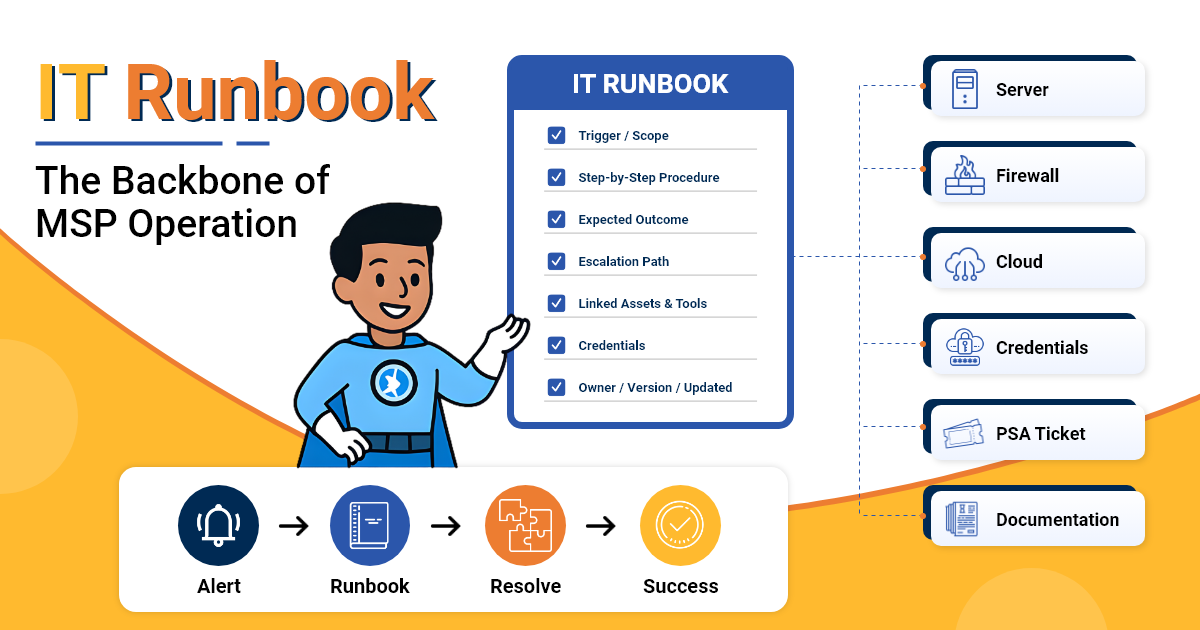
A runbook without structure is just a document. A well-structured runbook is an operational asset. Every IT runbook should include:
- Task scope and trigger condition: What this runbook covers and what event or request initiates it.
- Expected outcome: What “done” looks like - measurable, not subjective.
- Step-by-step procedure: Sequential, executable steps written for the technician performing them, not the person who wrote them.
- Escalation path: Who to contact, at which step, under which conditions.
- Linked device and asset records: Direct links to the relevant server, network device, or service - not a separate tab or folder.
- Linked credentials: Access to the required accounts without leaving the runbook context.
- Owner, reviewer, version, and last-updated fields: Accountability and currency, a runbook with no date is a runbook no one trusts.
⚠ The Runbook Credibility Test
Hand the runbook to a technician who has never worked the environment.
If they can execute it without asking a single question, it’s ready. If they need clarification at any step, that step needs rewriting.
Types of IT Runbooks for MSPs and IT Infrastructure Teams
Not every IT runbook serves the same purpose. These are the five categories MSPs and IT teams rely on most:
| Runbook Type | Primary Trigger | Typical Scope |
|---|---|---|
| Incident Response | Monitoring alert, service outage, security event. | Triage steps, escalation path, resolution, post-mortem. |
| Onboarding / Offboarding | New hire, contractor, or user departure. | Account creation, access rights, device provisioning, deactivation. |
| Patch Management | Scheduled window or vulnerability disclosure. | Pre-patch checks, rollback plan, post-patch validation. |
| Backup Verification | Scheduled job or recovery test request. | Job status check, restore test, retention confirmation. |
| Network / Firewall Change | Change request approval. | Pre-change state, change steps, rollback, sign-off. |
Each type follows the same core structure but serves a different trigger and outcome.
An incident response runbook moves fast and prioritizes resolution speed. A network change runbook moves carefully and prioritizes reversibility.
How to Store and Manage IT Runbooks in a Centralized Platform
Why Spreadsheets and Shared Drives Fail
- No version control: Technicians cannot tell which copy is current.
- No relationships: A runbook stored in a shared folder has no connection to the device or service it covers.
- No audit trail: No record of who changed what, or when.
- No access control: Sensitive runbooks with credentials visible to the wrong people.
Linking Runbooks to Asset Records
The operational value of a runbook is highest when accessed in context. In IT Portal, runbooks live inside the IT runbook template structure and link directly to the device or service they cover.
When a technician opens a server record during an incident, the relevant runbook is right there and not in a different system, not behind a search.
Linked credentials, network documentation, and change history live in the same record. That’s the difference between a runbook library and a runbook that gets used.
Version Control, Audit Logs, and Role-Based Access
- Version control: Every edit is tracked with a timestamp and the user who made it.
- Audit logs: Every access and change is logged automatically - compliance evidence that builds itself.
- Role-based access: Technicians see the runbooks they need; credential-linked procedures are restricted to authorized roles.
PSA and RMM Integration
IT Portal's PSA and RMM integrations can help connect operational data with structured documentation, reducing the need to manage information across disconnected systems - so technicians spend less time hunting for the right procedure and more time executing it.
How Structured Runbooks Support Automated IT Workflows
A runbook is most valuable when it's structured clearly enough to plug into the rest of an MSP's toolchain. Runbook automation MSP implementations turn well-documented procedures into inputs for monitoring, PSA, RMM, or other workflow tools - rather than documents technicians have to hunt down and interpret on the fly.
- Trigger-based workflows: When a runbook's scope and trigger conditions are clearly defined, monitoring and RMM tools are better positioned to point technicians to the right procedure as soon as an alert fires.
- PSA-ready structure: Runbooks written with clear steps, assignees, and escalation points are easier to translate into PSA ticket workflows with defined ownership and SLA timers.
Key metrics that benefit from well-structured, automation-ready runbooks:
- MTTR (Mean Time to Resolution): Faster when technicians can execute a clear procedure rather than decide what to do.
- First-call resolution: Higher when the runbook covers the full procedure, including escalation decision points.
- SLA compliance: More consistent when response steps are defined, timed, and tracked.
Automation tools can help trigger or standardize parts of a workflow, but the quality of the documented runbook still determines whether technicians have the right context and instructions when it matters.
You Might Also Like To Read:
How to Document IT SOPs: Templates, Examples & Best Practices
Runbooks That Live in Context Are Runbooks That Get Used
An IT runbook stored in a shared folder is a document. An IT runbook linked to the asset it covers, version-controlled, access-restricted, and connected to your PSA is an operational asset.
IT Portal helps MSPs keep runbooks connected to the client, device, credentials, and supporting documentation technicians need when the procedure is used — through hierarchical documentation, linked records, templates, device context, credential references, change history, and role-based access.
Runbooks stay current because documentation updates are part of the workflow, not an afterthought.
The result is more consistent service delivery across every technician, every client, and every incident - regardless of who's on shift.
A runbook technicians can’t find in the moment is a runbook that doesn’t exist when it matters most.
Ready to build runbooks your team will actually use?
See how IT Portal helps MSPs organize runbooks, device records, credentials, and supporting documentation in one structured system. Explore IT Portal's Templates and KB features, or book a live demo to see it in action.
Frequently Asked Questions
An SOP defines the standard process for a category of tasks - repeatable, role-level guidance. An IT runbook defines the exact procedure for a specific system, event, or scenario, step-by-step and linked to real assets. A policy sits above both, defining what must be done and why.
Task scope and trigger condition, expected outcome, step-by-step procedure, escalation path, linked device and asset records, linked credentials, and owner, reviewer, version, and last-updated fields. A runbook with no date is a runbook no one trusts.
They offer no version control, no relationships to the device or service the runbook covers, no audit trail of who changed what, and no access control over runbooks that reference credentials.
No. IT Portal's PSA and RMM integrations can help connect operational data with structured documentation, reducing the need to manage information across disconnected systems. Automation tools can help trigger or standardize parts of a workflow, but the quality of the documented runbook still determines whether technicians have the right context and instructions.


