Most IT documentation platforms list audit logs as a security feature during evaluations. You check the box and move on.
These logs only become essential when something actually goes wrong - a credential viewed before an outage, a senior technician leaving after accessing multiple client environments, or a client questioning an unexplained change.
This blog explains what strong audit logs look like in real MSP environments, why many platforms fall short when incidents occur, and how the right platform turns logs from a forgotten checkbox into a practical tool for faster resolution and stronger client trust.
Real-World Scenarios Where Audit Logs Prove Their Value
Here are four common MSP situations that show why basic logging often isn't enough:
- Client escalation during maintenance: A configuration changed during a scheduled window, but the ticket only shows approval. The client wants to know exactly who accessed the device record and what they viewed or edited. Ticket-level logs cannot answer this; only per-record access history can.
- Credential incident before an outage: A critical password was viewed the night before a major issue. The team needs to know who viewed it, when, and from which IP address. Without clear view logging, the investigation stalls.
- Technician offboarding: A senior engineer who had access to 47 client environments resigns. Before access is revoked, leadership needs visibility into what was viewed versus changed. Without granular records, there is no clear way to confirm nothing sensitive was copied.
- Disputed client change: A client claims a configuration was modified without approval. The MSP needs a timestamped, user-attributed record tied directly to the documentation object to defend its actions. These situations happen regularly. The quality of your audit logs determines whether you can answer quickly and confidently.
You might also like:
How Common Platforms Fall Short
Many platforms claim strong logging, but the specifics can vary widely once you look closely. Before relying on any platform's audit trail, it's worth checking whether it covers the details that matter most in MSP environments.
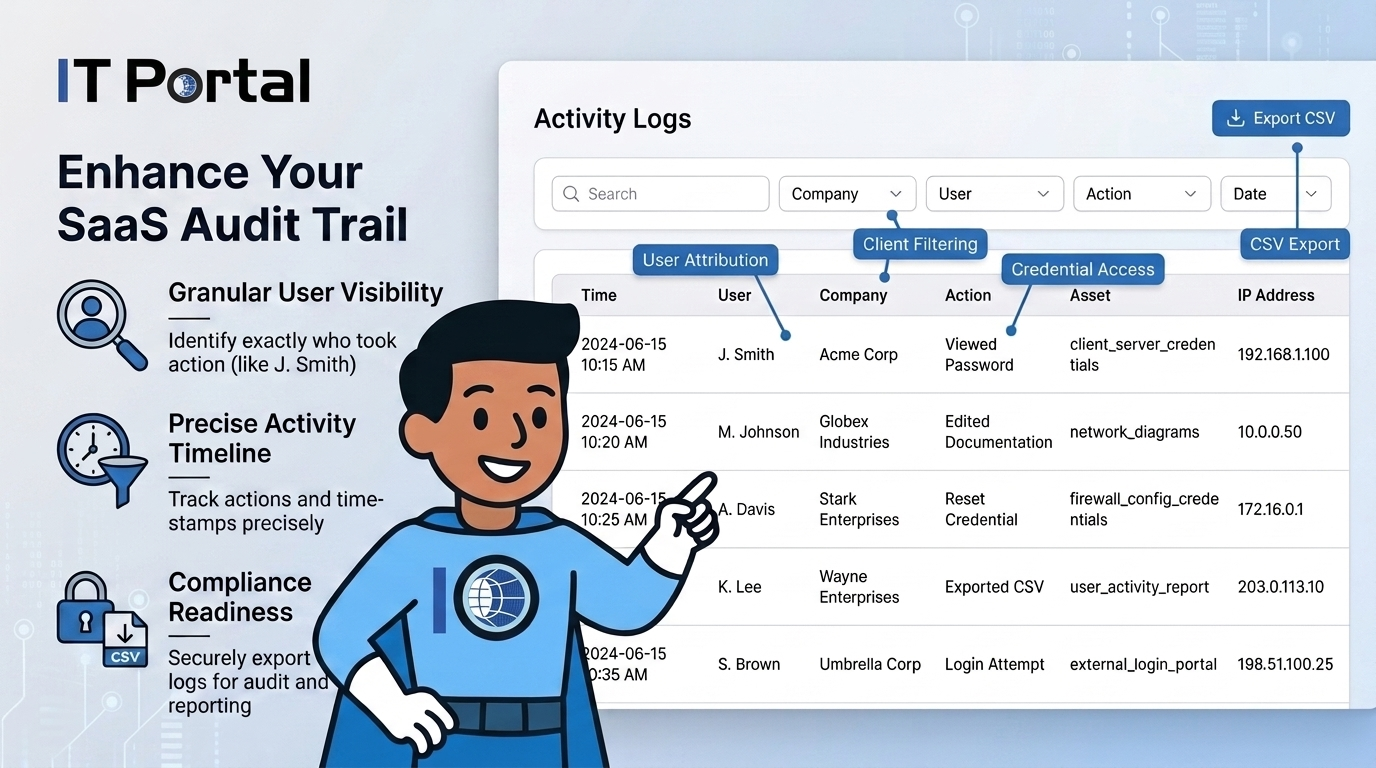
Some platforms may offer audit logging, but MSPs should review whether those logs include view events, per-record history, client-level filtering, export options, and user attribution. Gaps in any of these areas can leave you without the detail needed to reconstruct a full sequence of events or confidently attribute specific actions - especially when you need more than a basic "something changed" record.
What Effective Audit Logging Covers
Strong audit logs in an IT documentation platform go beyond basic change tracking. Here are the five capabilities that matter most:
Password views, not just changes: Reading a credential is often the highest-risk action. If view events are not logged with user and timestamp details, you lack a complete credential audit trail.
Access source details: Recording the IP address and session context for every action turns a generic log entry into something useful. An 11 p.m. access from an unfamiliar location is very different from daytime access from a known office.
Relationship and link changes: When technicians edit connections between assets, passwords, or configurations, those relationship modifications should be logged separately. Many platforms only track edits to primary records and miss these context changes.
Failed access attempts: Repeated failed attempts to open a restricted record or password often signal either a permission issue or something more concerning. Platforms that log only successful actions miss this early warning entirely.
Admin-level changes: Permission modifications, user additions, and IP access control updates represent high-impact events. These need their own clear, attributable trail so MSPs can quickly demonstrate who made security-relevant changes and when.
Audit Logs as a Client Retention Advantage
Finance, legal, and healthcare clients are increasingly asking for access activity reports during quarterly business reviews. They want to see who touched their records and when - not just that the MSP follows good security practices.
MSPs who can quickly produce clean, per-client activity logs position themselves as accountable and transparent partners. Those who cannot create doubt at renewal time, even when their actual security posture is strong.
The IT documentation tool that makes these reports easy to generate turns audit logging into a practical client-retention asset.
Compliance Becomes Simpler When Logs Answer Real Questions
SOC 2 Type II, CMMC Level 2, and cyber insurance questionnaires now ask for specific details about log retention and tamper-evidence.
When logs are clear, attributable, and easy to filter, they can help teams respond more efficiently to audit and compliance-related documentation requests. Audit logs can help MSPs organize access and change records that may support CMMC-related documentation efforts.
When logs cannot answer the operational question - who did what, when, and from where - they're unlikely to be much help with the compliance one either.
Audit logs are not used every day. But the day you need them - for an incident, offboarding, a disputed change, or an auditor request - you need them fast and easy to filter by client.
IT Portal's Logs Access and Change History features deliver per-record activity with full user attribution, company-level filtering, and CSV export. The June 2026 addition of the Company column to activity logs further improves day-to-day visibility across multi-client environments. This is operational capability, not just a compliance checkbox.
See how IT Portal helps MSPs track access, review changes, filter logs by client, and support audit preparation with structured documentation.
Frequently Asked Questions
Yes. Log entries are recorded at the time of the action and aren't editable after the fact, so a technician can't alter the record to cover their tracks.
Only the view event - who accessed it, when, and from where. The credential value itself is never written into the log, so your audit trail doesn't become a second place sensitive data could leak from.
Yes. With the Company column added in June 2026, logs can be filtered per client, which matters most during offboarding reviews or when a specific client requests an activity report.
Yes. Admin-level actions - like permission changes, new user additions, or IP access control updates - are logged separately from routine document edits, so security-relevant changes are never buried in general activity.
Yes, logs can be exported to CSV, which covers most SOC 2, CMMC, and cyber-insurance documentation requests without manual reformatting.


