Enterprise IT Asset Management is the practice of tracking every hardware, software, cloud, and network asset across its entire lifecycle. At enterprise scale, the risks of getting it wrong are concrete: untracked assets, license audit failures, missed warranty renewals, and security vulnerabilities that sit undetected for months.
Many organizations still struggle to maintain complete and current IT asset records, which is why Enterprise IT Asset Management belongs in the strategy conversation, not filed away as a routine inventory exercise.
What Is Enterprise IT Asset Management?
Enterprise IT Asset Management is the full lifecycle tracking of hardware, software, cloud, and network assets - from the moment they're procured to the day they're retired.
ITAM vs. ITSM
The two disciplines complement each other but answer different questions. ITSM manages how IT services are delivered and supported. ITAM manages what you actually own, where it lives, and what condition it's in. Neither replaces the other - incident response depends on both.
Why Spreadsheets Stop Working at Scale
A spreadsheet can track twenty assets. It cannot reliably track two thousand across multiple sites, vendors, and technicians. Picture a technician trying to figure out which laptop belongs to which client during a support call, with three tabs open and none of them matching what's actually in the field. Enterprise environments need structured device inventory management with enforced templates, ownership, and relationships - not a shared file that drifts out of date within weeks.
Key stakeholders include MSPs managing client environments, IT Managers overseeing internal infrastructure, Network Managers responsible for connectivity, and Infrastructure Admins running day-to-day operations.
Core Components of Enterprise IT Asset Management
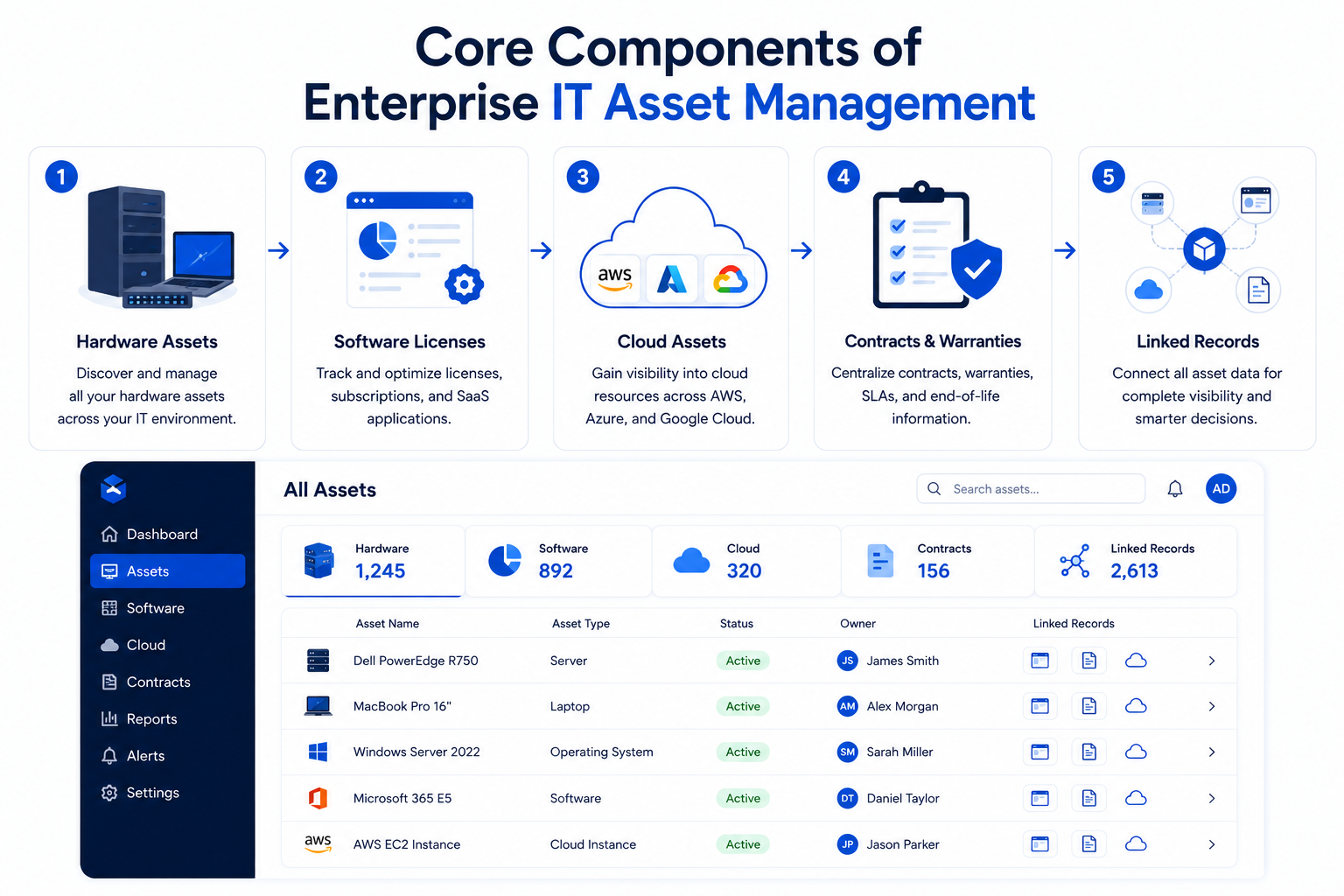
- Hardware assets: servers, endpoints, networking gear, and peripherals
- Software assets: licenses, subscriptions, and SaaS applications - the core of software license management
- Cloud and virtual assets: VMs, IaaS, and PaaS resources that don't show up in a physical walkthrough
- Contract and compliance records: warranties, SLAs, and end-of-life dates tied to each asset
The Enterprise IT Asset Lifecycle, Stage by Stage
Every asset moves through the same four stages, and each stage has its own documentation requirement:
| Lifecycle Stage | What Happens | Documentation Requirement |
|---|---|---|
| Procurement & Onboarding | Asset is purchased, received, and assigned an identity | Purchase date, vendor, warranty term, and owner recorded from day one |
| Deployment & Configuration | Asset goes live and enters active service | Configuration, network details, and dependencies documented at rollout |
| Maintenance & Refresh | Patches, upgrades, and performance monitoring over time | Change history logged; refresh timeline tracked against EOL data |
| Retirement & Disposal | Asset is decommissioned and securely wiped or destroyed | Decommission record closes out the asset's documentation for internal review |
Proactive EOL and warranty flagging on a 12-month horizon, rather than discovering an expired warranty in the middle of an outage, is what separates a mature ITAM program from a reactive one.
Why Manual ITAM Fails at Enterprise Scale
- Spreadsheet drift: Every unrecorded change creates a gap, and gaps compound fast across thousands of assets. A VM spun up outside the usual process is easy to miss - and easy to leave unpatched for months.
- Technician dependency: When asset knowledge lives in one person's memory, it leaves when they do, and the next person on the ticket starts from zero - a common problem for MSPs rotating technicians across client sites.
- Compliance gaps: Incomplete records make audit preparation harder and slower, especially when reviewers need to trace an asset's full history.
- Shadow IT blind spots: Untracked assets are the ones nobody is patching or monitoring - and often the ones still being paid for long after anyone uses them. A software license quietly renewed year over year for a tool no one on the team even opens anymore is one of the easiest costs to miss without a clear asset-to-license record.
Enterprise IT Asset Management Best Practices
- Centralized repository with hierarchical structure: Organize by Site → Facility → Cabinet so every record has context - critical for MSPs juggling multiple client environments under one roof, and for separating what belongs to Client A from what belongs to Client B.
- Automated discovery: Bring device data in through agentless scanning where possible, agent-based tools for managed endpoints, and manual entry where automation isn't available.
- Role-based access and audit logging: Every access and change tracked automatically.
- Naming conventions and tagging: Consistency that survives staff turnover and technician handoffs - so the next technician on a ticket isn't guessing which device belongs to which client.
- Quarterly physical reconciliation: Matching digital records against what's actually deployed.
- RMM and PSA integration: Reduce manual re-entry by connecting existing tools where integrations are available.
The MSP Angle: Multiplying These Practices Across Clients
For MSPs, ITAM discipline isn't just an internal hygiene exercise - it plays out across every client relationship:
- Onboarding: A new client's device inventory needs to be documented and organized from day one, not reconstructed months later during a support escalation.
- Client/site separation: Assets, licenses, and contracts need to stay cleanly scoped to the right client and site, so nothing bleeds across environments.
- Technician handoffs: When a ticket moves between technicians (or a technician leaves), the asset record - not their memory - needs to carry the context.
- Client reporting: Being able to answer "what does this client have, and what's it costing them?" without digging through separate spreadsheets or systems.
- Asset-to-license visibility: Linking each license back to the client and device it belongs to, so renewals reflect what's actually in use.
How a Centralized Documentation Platform Strengthens Enterprise ITAM
A structured IT documentation platform is what turns these best practices into daily operating habits rather than quarterly cleanup projects:
- Synopsis View: Instant cross-client or cross-site asset visibility from a single screen - useful for MSPs who need to answer "what does this client have?" without digging through separate systems.
- Relationship mapping: Understand asset dependencies before making a change, not after it breaks something.
- Change history and audit trails: A running record of what changed and when, organized to support audit preparation and internal review rather than assembled after the fact.
- Network Import and device import options: Help teams bring asset data into IT Portal and organize it within structured documentation, instead of re-entering it by hand.
- Free company user access: Client-facing transparency without added licensing cost.
You Might Also Like
Network Inventory Advisor: A Practical Guide for MSPs and IT Infrastructure Teams
A closer look at the discovery and hierarchy practices that feed directly into enterprise ITAM.
Turn Asset Visibility into Operational Control
Enterprise IT Asset Management isn't a spreadsheet problem you solve once, it's an ongoing operational discipline built on hierarchical structure, asset-to-license linking, and audit-ready reporting that stays current as your environment grows.
IT Portal supports enterprise ITAM efforts by helping teams document assets, connect them to related records, track changes, and keep asset context accessible - bringing Network Import and device import together with the hierarchical structure, relationship mapping, and change history that MSPs and enterprise IT teams need, so what's discovered becomes documented, not just found.
An asset you can't see in your documentation is an asset you're already failing to manage.
Ready to bring every asset into one view?
Explore IT Portal's Network Import: itportal.com/features/network-import
Book a live demo: https://www.itportal.com/more/live-demo/


