When a security incident or outage hits, the difference between a fast recovery and a chaotic one usually isn't the incident itself.
It's whether the documentation your team needs is actually where you expect it to be.
Incomplete or outdated records turn a routine response into a scramble.
Technicians hunting for credentials, nobody sure which asset owns which config, and a post-incident report built from memory instead of facts.
The cost isn't limited to the incident itself - every gap in documentation becomes a gap in the eventual audit trail, too.
This incident response checklist for IT teams walks through exactly what SysAdmins, ITOps, and SecOps teams need on hand before the next incident.
Use this incident response checklist for IT teams as a working audit of your current setup, not just a reading list.
Why Incident Response Documentation Matters
Good documentation shows up in five concrete ways during an incident:
Faster resolution.
When system details, credentials, and dependencies are already documented, technicians spend time fixing the problem instead of finding the information.
Clearer communication.
Shared, current documentation keeps every responder working from the same facts, which matters most when several teams are involved at once.
Less downtime.
Every minute spent searching for a password or a network diagram is a minute the business stays offline.
Audit and compliance readiness.
Frameworks and audit processes related to SOC 2, CMMC, and other security requirements often look for evidence of repeatable, documented response processes.
Better post-incident analysis.
You can only learn from what you recorded. A weak paper trail during the incident means a weak lessons-learned report afterward.
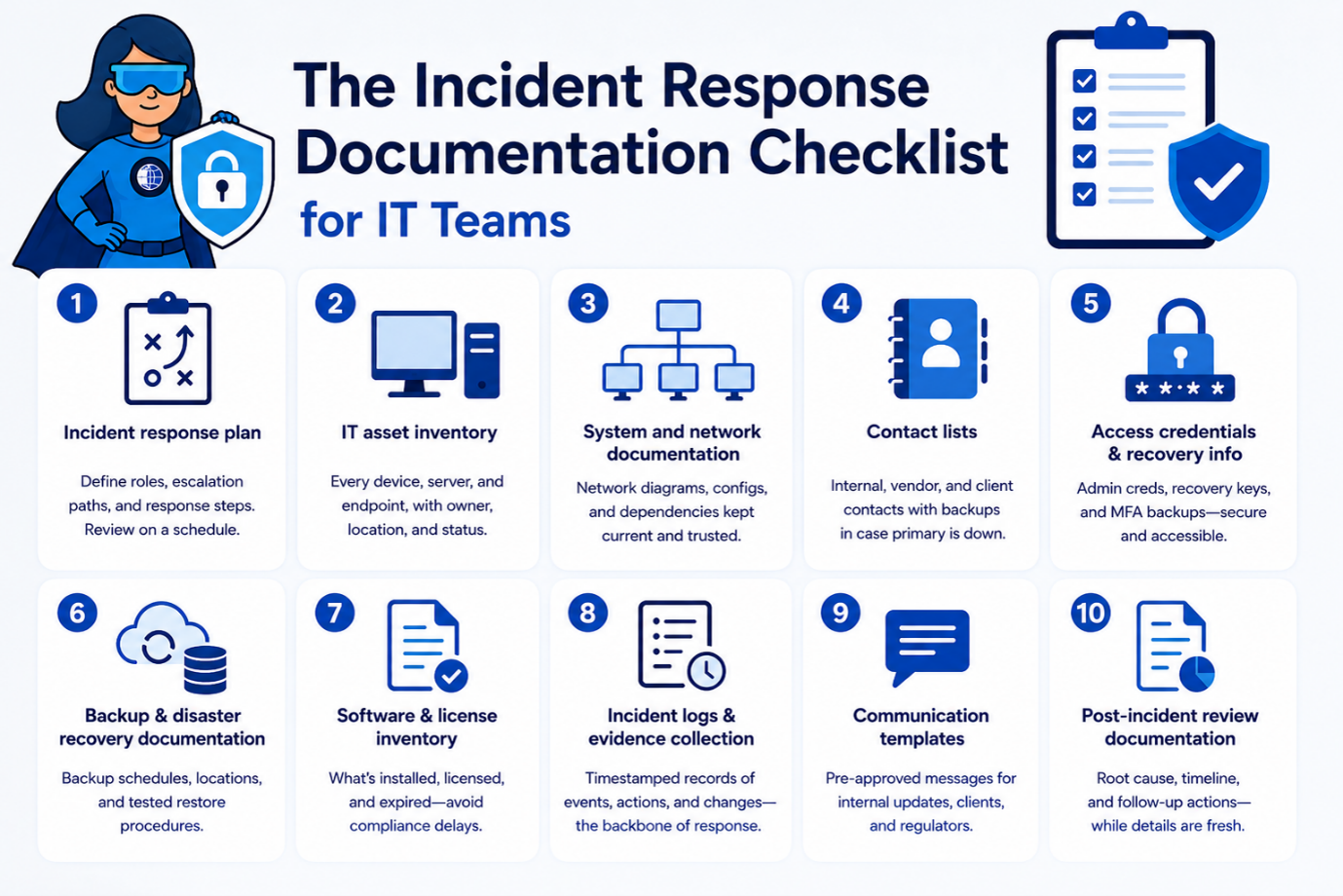
The Incident Response Checklist for IT Teams
1. Incident response plan.
A written, current plan defining roles, escalation paths, and response steps - reviewed on a schedule, not just written once and filed away.
2. IT asset inventory.
Every device, server, and endpoint, with owner, location, and status. If an asset isn't documented, it's invisible during triage.
3. System and network documentation.
Network diagrams, configurations, and dependencies, kept current enough to trust during a live incident.
4. Contact lists.
Internal escalation contacts, vendor support lines, and client stakeholders, with backups listed in case the primary contact is unavailable.
5. Access credentials and recovery information.
Admin credentials, recovery keys, and MFA backup codes, stored securely and reachable by the right people without delay.
6. Backup and disaster recovery documentation.
Backup schedules, storage locations, and tested restore procedures - tested being the operative word.
7. Software and license inventory.
What's installed, what's licensed, and what's expired, so a response doesn't stall on a compliance question mid-incident.
8. Incident logs and evidence collection.
Timestamped records of what happened, who acted, and what changed - the backbone of both the response and any audit that follows.
9. Communication templates.
Pre-approved language for internal updates, client notifications, and regulatory disclosures, so nobody drafts a breach notice under pressure.
10. Post-incident review documentation.
A structured record of root cause, response timeline, and follow-up actions, filed while details are still fresh.
For MSPs managing multiple client environments, incident response documentation needs to be organized by client, site, asset, and access level so technicians can quickly find the right context during an outage.
Common Documentation Gaps That Delay Response
A few patterns show up again and again in teams that struggle during incidents:
- Outdated documentation that no longer matches the live environment
- Missing asset records for devices added outside the standard process
- Scattered information spread across spreadsheets, tickets, and personal notes
- Incomplete contact lists missing backups or current numbers
- No standardized templates, so every response starts from a blank page
Any one of these adds minutes to a response. Together, they add hours and they tend to compound at the worst possible moment, when several teams are trying to work from the same incomplete picture at once.
Best Practices for Keeping Documentation Current
Centralize documentation.
One system of record beats five partial ones.
Review regularly.
Set a recurring cadence - quarterly at minimum rather than waiting for an audit to force the issue.
Assign ownership.
Documentation without an owner tends to go stale fastest. Each critical record should have an owner, a last-reviewed date, and a review cadence. Incident response documentation should also be updated after major changes, outages, vendor updates, and post-incident reviews.
Test the documentation itself.
Run a tabletop exercise using only what's written down. Gaps surface quickly.
Use review and expiration reminders where available.
Set reminders for documentation reviews, expirations, and key updates so nothing slips through manual processes.
You might also like: IT Asset Management Software: The Documentation Guide
How IT Portal Simplifies Incident Response Documentation
IT Portal is built around the idea that documentation should be ready before you need it, not assembled during the incident.
Centralized documentation keeps assets, configurations, and procedures in a single system instead of scattered across tools.
Linked asset records connect every device to its configurations, credentials, and licenses, so responders move from device to context in one step.
Secure credential management stores admin logins and recovery keys with role-based access - available to the right responder, invisible to everyone else.
Site and company organization mirrors your real infrastructure, from headquarters down to individual server rooms, so multi-location teams aren't guessing where something lives.
Expiration tracking flags software licenses, certificates, and warranties before they become a mid-incident surprise.
Fast search and reporting can reduce the time teams spend looking for critical records during an incident.
With better documentation in place, teams can reduce the time spent searching for information and focus more quickly on response.
Documentation stops being a bottleneck and starts being the reason the response works.
Building an Incident-Ready Documentation Practice
Strong incident response documentation isn't a one-time project. It's a discipline: centralized records, clear ownership, and a habit of testing what you've written before you're forced to rely on it under pressure.
Start by auditing what you have today. If your team can't answer "where's the network diagram" or "who has the admin credentials" in under a minute, that's the gap to close first.
See how IT Portal helps IT teams and MSPs centralize assets, credentials, network documentation, and recovery information so critical records are easier to find before an incident hits.


