Every client environment is different.
But the way your MSP documents each client should not be completely different every time.
When every client record follows its own format, technicians have to relearn where information lives. One client's credentials may be documented one way. Another client's vendor notes may be buried in tickets. Another client's assets may have no owner, location, or history attached.
That slows down support.
Standardized client records give MSPs a repeatable structure for documenting the information technicians need every day. They help teams find details faster, reduce guesswork, onboard new technicians more easily, and deliver more consistent service across every client environment.
Here is what every MSP should include in a standardized client record.
1. Core Client Details
Every client record should start with the basics.
This includes the client's company name, locations, main contacts, support contacts, billing contacts, and escalation contacts. These details may seem simple, but they are often the first things technicians need during support.
When a ticket comes in, the team should quickly know:
- Who is the main point of contact?
- Who approves changes?
- Who handles billing or account questions?
- Which location or site is affected?
- Who should be contacted during an urgent issue?
Without clear client details, technicians waste time asking around before they can move the ticket forward.
For MSPs managing multiple client environments, this basic structure matters. Each client record should give the team a quick snapshot of who the client is, how support should be handled, and who needs to be involved when something changes.
2. Support Expectations and Service Details
A strong client record should include more than contact information.
Technicians also need to understand how the client expects support to work. This can include service agreements, response expectations, covered services, excluded services, preferred communication methods, and escalation rules.
For example, one client may require approval before any system change. Another may have a specific contact for after-hours issues. Another may only allow certain users to request access changes.
Documenting these details helps technicians avoid confusion.
Support expectations may include:
- Service agreement details
- Response expectations
- After-hours support rules
- Preferred communication channels
- Approval requirements
- Escalation instructions
- Client-specific support notes
This helps the team deliver support in a way that matches the client relationship.
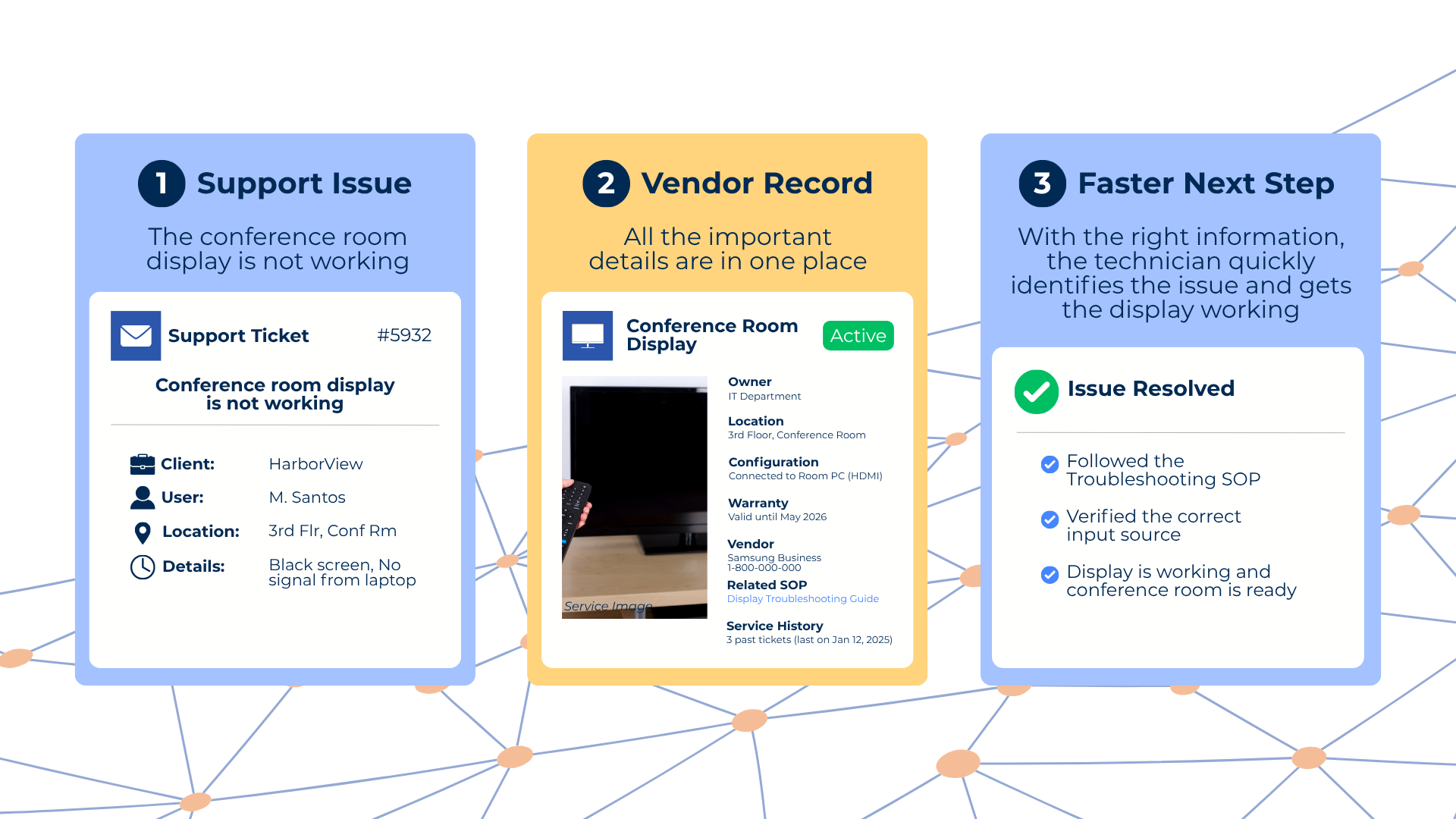
3. Asset Records
Asset documentation is one of the most important parts of a standardized client record.
Your team should be able to see what devices, systems, and services belong to the client. But a useful asset record should include more than a device name.
Each asset should include context such as:
- Asset name
- Asset type
- Owner or assigned user
- Location or site
- Configuration details
- Warranty or lifecycle information
- Related credentials
- Related SOPs or runbooks
- Vendor details
- Service history
- Recent changes
This context matters during support.
If a technician opens a ticket related to a server, workstation, firewall, printer, or application, they should not have to guess who owns it, where it lives, what it connects to, or what changed recently.
Standardized asset records help technicians understand the environment before they take action.
4. Credentials and Access Details
Credentials should be documented securely and with clear context.
A password field alone is not enough. Your team also needs to know what the credential is for, who owns it, where it is used, who should have access, and when it was last reviewed.
Credential documentation should include:
- Credential name or purpose
- Related system or asset
- Access level
- Owner
- Approved users or roles
- Review date
- Related SOPs
- Notes on usage or restrictions
This is especially important during onboarding, offboarding, incidents, and access reviews.
When credential records are unclear, teams lose control over who can access what. They may not know which credentials need to be rotated, removed, reviewed, or updated.
For MSPs managing sensitive client information, credential documentation needs structure, ownership, and access control.
5. SOPs and Runbooks
Repeatable work should have repeatable documentation.
Every client record should include or connect to the SOPs and runbooks technicians need to support that client. This helps keep service consistent across the team.
Examples of SOPs and runbooks include:
- Password resets
- Backup checks
- User onboarding
- User offboarding
- Vendor escalation
- Patch management procedures
- Troubleshooting steps
- Client-specific workflows
- Application support instructions
- Incident response steps
SOPs are especially useful when a technician is supporting an unfamiliar client environment.
Instead of asking a senior technician what to do next, they can follow the documented process. This reduces guesswork and helps the team provide more consistent service.
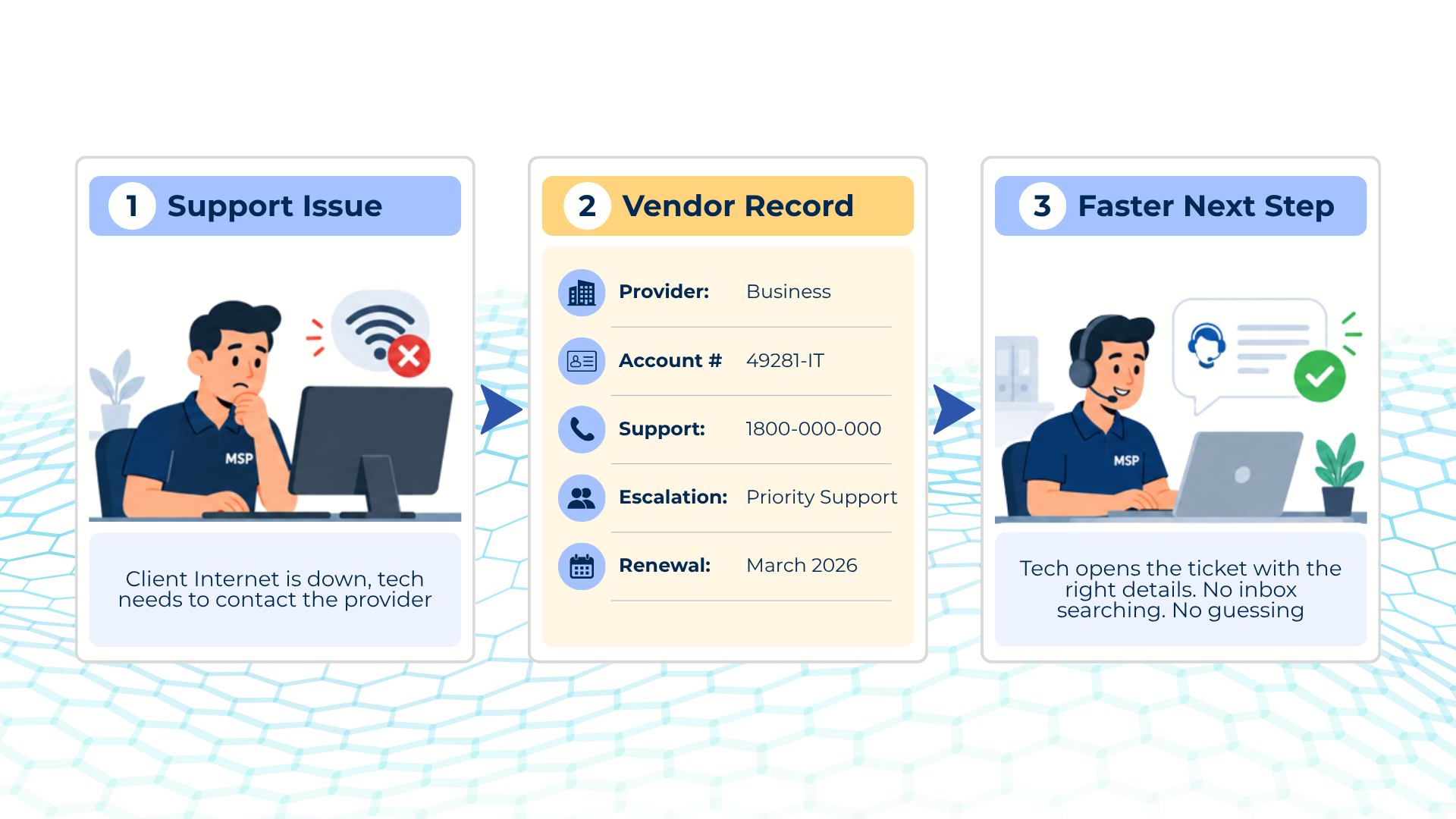
6. Vendor Information
Vendor details should not live in someone's inbox.
Every standardized client record should include key vendor information so technicians know who to contact, what account details to provide, and how to escalate when needed.
Vendor documentation should include:
- Vendor name
- Service or product provided
- Contact information
- Account number
- Support process
- Escalation path
- Renewal date
- Contract or agreement notes
- Related assets or systems
This matters when there is an outage, renewal, billing question, or support issue.
If the team has to search through old emails to find vendor contact details, support slows down. Clear vendor records help technicians act faster and avoid unnecessary delays.
7. Client-Specific Notes
Every client has details that do not always fit into a standard field.
That is why client-specific notes are important. These notes help technicians understand preferences, exceptions, recurring issues, and important context that affects service delivery.
Client-specific notes may include:
- Preferred communication style
- Known recurring problems
- Special configurations
- Approval preferences
- Important internal contacts
- Client-specific restrictions
- Notes from previous escalations
- Environment-specific reminders
These details help technicians avoid mistakes and communicate more effectively.
However, client notes should still be organized. If notes become a dumping ground, they lose value. Standardized sections and clear ownership help keep them useful.
8. Service History
Service history helps technicians understand what has already happened.
A ticket rarely exists in isolation. A current issue may connect to a past problem, recent change, previous escalation, or recurring pattern.
Client service history should help answer:
- Has this issue happened before?
- What was done last time?
- Was there a recent change?
- Which technician handled it?
- Was a vendor involved?
- Is this part of a larger pattern?
When service history is easy to access, technicians can troubleshoot with more context. They can avoid repeating work, asking the same questions, or missing patterns that already exist in the documentation.
Service history also supports smoother handoffs. If one technician starts the work and another takes over, the next person should be able to understand what happened without starting from zero.
9. Change History
Change history is one of the most valuable parts of client documentation.
When something breaks, one of the first questions is often:
"What changed?"
A standardized client record should make it easier to review recent updates, especially around assets, credentials, SOPs, access details, and client notes.
Change history helps teams understand:
- What changed
- Who updated it
- When it happened
- What record was affected
- Why the change matters
This is useful during troubleshooting, audit preparation, internal reviews, offboarding, and handoffs.
Change history gives technicians more context before they take action.
10. Ownership and Review Dates
A client record should not be created once and forgotten.
Every important record should have an owner and a review date. This helps keep documentation accurate over time.
Ownership answers:
- Who is responsible for this record?
- Who approves updates?
- Who reviews it?
- Who should be contacted if something looks wrong?
Review dates help the team know when a record was last checked and whether it may need attention.
This is important for:
- Credentials
- Asset details
- SOPs
- Vendor contacts
- Access permissions
- Client notes
- Service expectations
If no one owns the record, updates get missed. If records are not reviewed, they slowly become harder to trust.
Why Standardized Client Records Matter
Standardized client records help MSPs scale support without creating more confusion.
When records follow the same structure across every client, technicians can move between environments more easily. They know where to find contacts, assets, credentials, SOPs, vendors, service history, and notes.
This supports:
- Faster ticket resolution
- Smoother handoffs
- Better onboarding for new technicians
- More consistent service delivery
- Reduced dependency on senior technicians
- Easier access reviews
- Better audit preparation
- More reliable client documentation
The goal is not to make every client environment identical.
The goal is to make your documentation structure consistent enough that your team can trust it.
Common Problems With Non-Standardized Client Records
When client records are inconsistent, the team feels it.
Some common issues include:
- Technicians cannot find the right contact
- Asset records are missing owner or location details
- Credentials are not connected to the right systems
- SOPs are outdated or stored separately
- Vendor information is buried in email
- Client notes are unclear or scattered
- New technicians rely too heavily on senior staff
- Handoffs lose important context
- Tickets take longer than they should
These problems may seem small at first. But as an MSP adds more clients, more technicians, and more systems, inconsistent documentation becomes a bigger operational issue.
How IT Portal Helps MSPs Standardize Client Documentation
IT Portal helps MSPs and IT teams organize client documentation in a structured system.
Instead of spreading information across folders, tickets, inboxes, spreadsheets, and personal notes, teams can centralize important client records and connect related information.
With IT Portal, MSPs can organize:
- Client details
- Asset records
- Credentials
- SOPs and runbooks
- Vendor information
- Service notes
- Related records
- Access details
- Change history
This gives technicians a clearer view of the client environment and helps the team work from a more consistent documentation structure.
When client records are standardized, support becomes easier to manage and easier to scale.
Keep reading this guide
The rest of this article is free. Tell us where to send it and we'll email you a link to the full post.
Check your inbox.
We sent a link to . Open it to read the full article.