Your clients may never see your documentation system.
They may never look at your asset records, credential notes, SOPs, vendor details, or service history.
But they absolutely feel the difference when your documentation is strong.
They feel it when tickets are handled faster.
They feel it when technicians ask fewer repeat questions.
They feel it when support is consistent, even when a different technician handles the request.
They feel it when your team understands the environment before taking action.
For MSPs and IT teams, documentation is not just an internal process.
It is part of the service experience.
Why Documentation Affects Client Service
Most clients do not care where your team stores information.
They care about the outcome.
When they submit a ticket, they expect your team to understand their environment, respond with confidence, and solve the issue without unnecessary delays.
That becomes harder when documentation is scattered, outdated, incomplete, or hard to trust.
If a technician has to search through tickets, inboxes, spreadsheets, chat threads, or personal notes just to understand the client environment, the client feels that delay.
Documentation affects service because it shapes how quickly and consistently your team can respond.
Good documentation helps your team answer questions like:
- Who owns this asset?
- Where is this device located?
- Which credentials are needed?
- What SOP should be followed?
- What vendor supports this system?
- What changed recently?
- Has this issue happened before?
When those answers are easy to find, support becomes smoother.
Documentation Helps Technicians Work With Context
A support ticket rarely tells the full story.
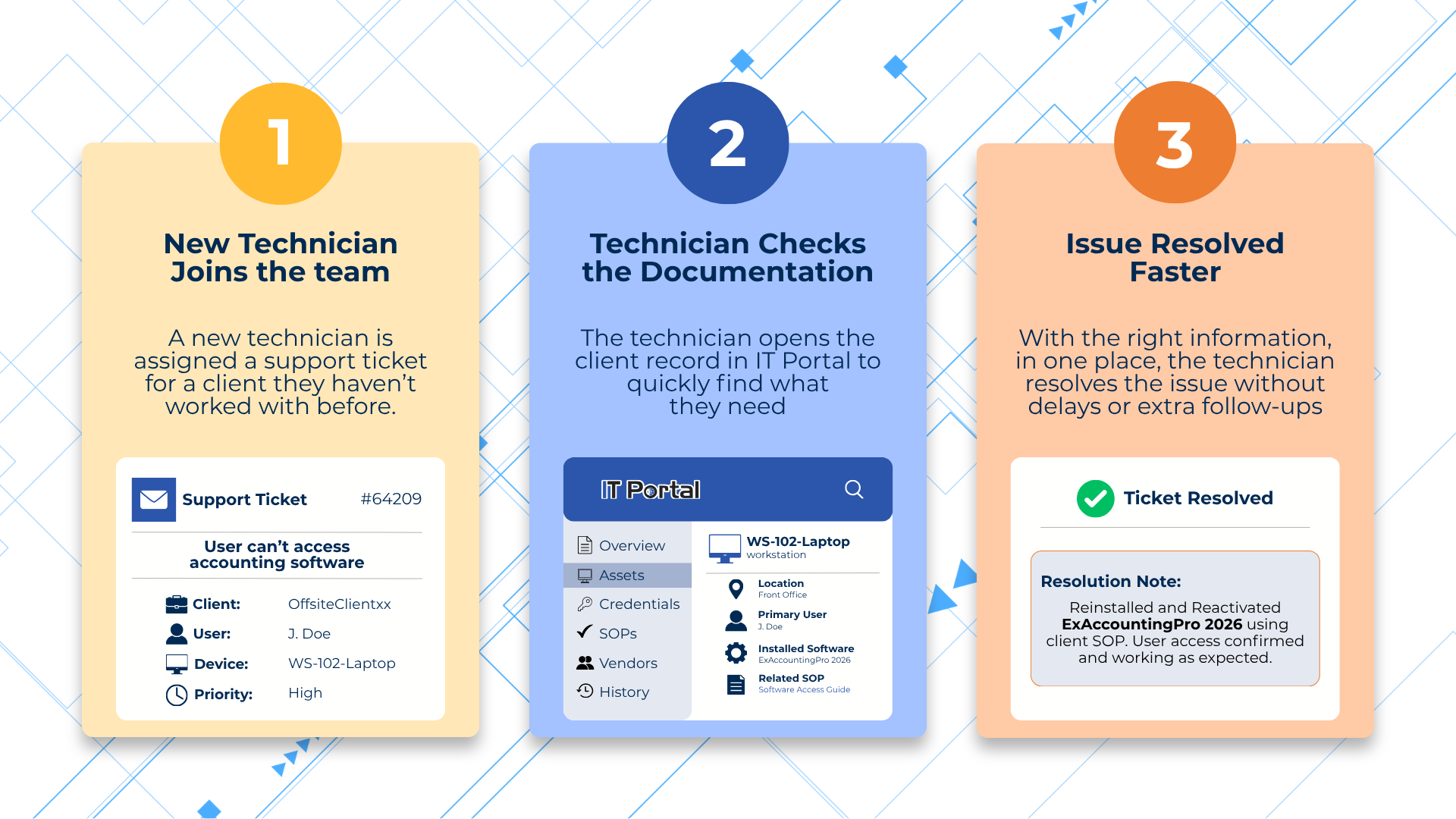
A ticket may say a device is not working, a user cannot access an account, or a system is behaving differently. But the technician still needs context before taking action.
They need to understand the client, the asset, the configuration, the access details, the related SOP, and the service history.
That is where documentation becomes part of the service.
For example, if a client reports an issue with a workstation, the technician should not have to guess:
- Who uses the device
- Where it is located
- What software is installed
- What credentials may be needed
- What recent changes were made
- What previous tickets are related
When this information is documented clearly, the technician can move from searching to solving faster.
Strong Documentation Creates More Consistent Support
Clients notice inconsistency.
They notice when one technician gives a clear answer and another has to start from zero.
They notice when they have to repeat the same information every time they open a ticket.
They notice when support depends too heavily on one senior technician who "knows the client."
Consistent documentation helps reduce those gaps.
When client records, asset details, credentials, SOPs, vendor information, and service history are organized in one structured system, technicians can work from the same source of information.
That means the client experience does not depend entirely on who picks up the ticket.
The team has a shared foundation.
Scattered Documentation Slows Down Service
Scattered documentation creates friction behind the scenes.
The client may not see it, but the team feels it.
A technician may need to check one system for tickets, another place for credentials, another folder for SOPs, and someone's message history for client notes.
That slows down support and creates room for mistakes.
Scattered documentation can lead to:
- Longer ticket resolution times
- More internal questions
- More client follow-ups
- Inconsistent answers
- Harder handoffs
- Slower onboarding for new technicians
- More dependency on senior staff
The more clients your MSP supports, the more important structure becomes.
What works for a small team with a few clients can quickly become unmanageable as the business grows.
What Strong Service Documentation Should Include
If documentation is part of your service, then it needs to support the way your team actually works.
For MSPs, strong service documentation should include:
Client Records
Your team should be able to quickly find key contacts, locations, service expectations, escalation paths, and client-specific notes.
Client records give technicians the basic context they need before working on a request.
Asset Records
Asset documentation should include more than a device name.
Useful asset records include ownership, location, configuration details, warranty information, related credentials, SOPs, and service history.
This helps technicians understand the asset before they take action.
Credentials and Access Details
Credential documentation should help the right people find the right access when needed.
It should also show context, such as who owns the credential, where it is used, when it was reviewed, and what systems it connects to.
SOPs and Runbooks
Repeatable work should not depend on memory.
SOPs and runbooks help technicians follow the right steps for common tasks, client-specific processes, backup checks, password resets, vendor escalations, and troubleshooting workflows.
Vendor Information
Vendor details should be easy to find before there is an issue.
Your team should know who to contact, what account details are needed, how to open a support request, when to escalate, and when renewals are due.
Service History and Change History
Service history helps technicians understand what has already happened.
Change history helps answer one of the most important support questions:
"What changed?"
Together, they give the team more context during troubleshooting, handoffs, and reviews.
Documentation Supports Better Handoffs
Handoffs are where weak documentation often shows up.
One technician starts the work. Another technician takes over. A senior tech gets pulled in. A client asks for an update.
If the details are not documented clearly, the handoff becomes messy.
The next technician may not know:
- What has already been checked
- What asset is involved
- Which credentials were used
- What the client already shared
- What the next step should be
- Whether anything recently changed
Strong documentation makes handoffs easier because the context stays with the record, not just the person.
That helps teams keep service moving without forcing clients or technicians to repeat the same information.
Documentation Helps New Technicians Deliver Better Service
Hiring more technicians does not automatically improve service.
New hires need structure before they can work confidently.
If documentation is unclear or scattered, new technicians may rely too heavily on senior staff. That slows everyone down.
A strong documentation foundation helps new technicians understand client environments faster.
They can find the records they need, follow SOPs, review asset context, access approved credentials, and learn how the MSP supports each client.
That makes onboarding easier and helps protect service consistency as the team grows.
Documentation Builds Client Confidence
Clients may not ask about your documentation process, but they benefit from it.
When your team responds faster, remembers important details, follows the right process, and gives consistent answers, clients feel more confident in your service.
Strong documentation helps show that your MSP is organized, prepared, and capable of supporting their environment over time.
It also helps during more sensitive moments, such as:
- Service disruptions
- Vendor escalations
- Client onboarding
- Client offboarding
- Audit preparation
- Staff changes
- Urgent support requests
In those moments, documentation becomes more than an internal resource.
It becomes part of how your team protects the client experience.
How IT Portal Helps MSPs Strengthen Service Documentation
IT Portal helps MSPs and IT teams organize the documentation behind better service.
With structured records for clients, assets, credentials, SOPs, vendor details, and service history, technicians can find the context they need more quickly.
Instead of relying on scattered notes or one person's memory, teams can work from a more organized source of information.
IT Portal supports MSPs by helping centralize critical IT knowledge, connect related records, manage access, and keep documentation easier to use across client environments.
The goal is simple:
Give technicians the information they need to support clients with more speed, clarity, and consistency.


