The Infrastructure You Inherit Is the Risk You Own
You just won a competitive deal. The contract is signed. The client is excited. Then the previous IT provider hands over the keys and almost nothing else.
No asset inventory. No network diagrams. No documented credentials. No runbooks. Just a departing IT contractor and a handshake.
The first 30 days aren't about delivering value - they're about reverse-engineering an environment someone else built. The MSP now owns every undocumented system, misconfiguration, and unknown dependency, whether they know about it or not. This is exactly the scenario a reliable IT documentation platform is built to solve.
Undocumented Infrastructure Is Inherited Liability
Every untracked server, orphaned firewall rule, and missing IP schema becomes a liability the moment the contract is signed. The first incident, before documentation is complete - quickly reveals how risky that gap really is.
This isn't a knowledge transfer problem. It's a structural risk problem that only a purpose-built documentation platform can systematically solve.
What separates MSPs that recover quickly? Having the right platform and process ready from day one. This guide shows you how the best IT documentation platform turns inherited chaos into operational control - and what to look for when reliability, collaboration, and deployment flexibility all matter to your evaluation.
What Is the Best IT Documentation Platform?
General tools like Confluence, Notion, or SharePoint are built for content collaboration. Purpose-built platforms are structured around how IT environments actually work: assets, networks, credentials, configurations, and clients.
For an MSP inheriting an undocumented environment, the structure of the platform determines how fast you go from zero to documented.
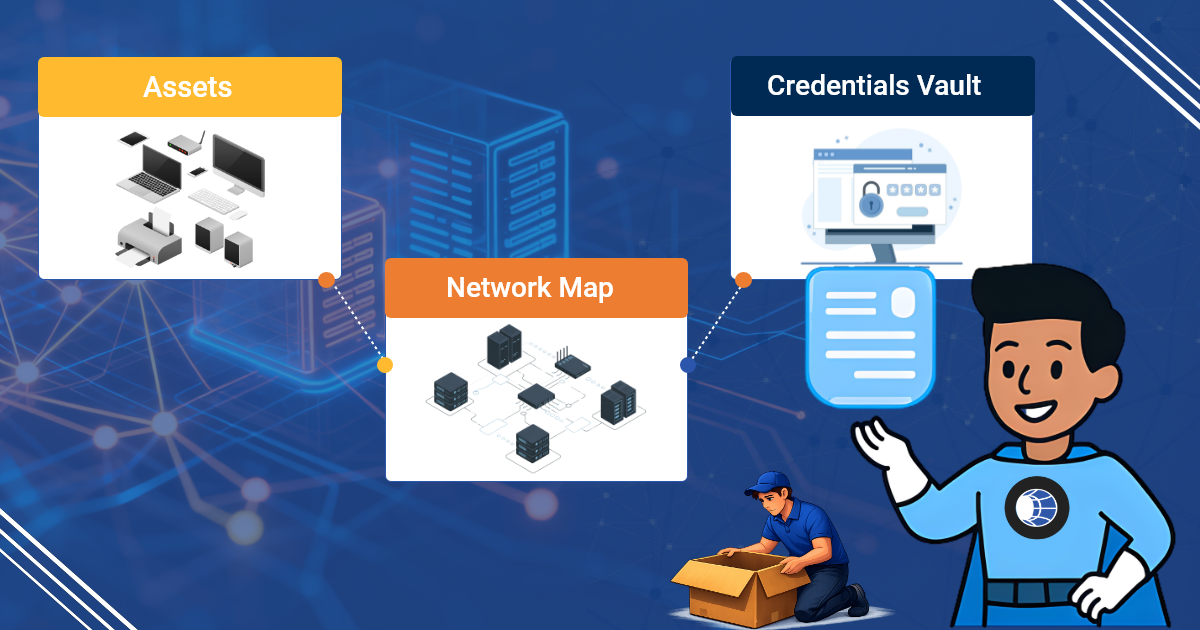
What a Purpose-Built IT Documentation Platform Actually Contains
- Asset records: Servers, workstations, network devices, VMs, cloud instances with configuration detail.
- Network documentation: IP schemas, VLAN tables, firewall rules, site topology.
- Credential vaults: Role-based access and full audit trails.
- Process documentation: SOPs and runbooks linked directly to assets.
- Client/tenant hierarchy: Multi-site, multi-client structure that mirrors how MSPs operate. IT Portal's hierarchical structure makes this natural and effortless.
Where IT Documentation Platforms Sit in the MSP Stack
RMM tools tell you what's happening. The best IT documentation platform tells you what everything is and how it all connects. The strongest platforms sync with ConnectWise, Autotask, NinjaRMM, and Datto so documentation stays in context.
What Makes an IT Documentation Platform Reliable for MSP Environments
"Reliable" isn't a marketing word here - it's a specific, testable requirement. When you're documenting an environment you didn't build, you need to trust that the record in front of you is accurate, available, and won't disappear when you need it most. A reliable IT documentation platform for MSPs holds up on four fronts:
- Uptime and infrastructure you can depend on. If the platform goes down during an incident, your documentation is useless exactly when it matters most. IT Portal runs on AWS infrastructure with the resilience MSPs need for 2 a.m. escalations, not just business-hours lookups.
- Data integrity over time. Reliable platforms enforce structure - required fields, templates, and relationships - so records don't quietly decay into unusable notes. Unstructured tools let documentation drift; purpose-built platforms resist it by design.
- Audit trails that prove what happened. Every credential reveal, edit, and access event should be logged. IT Portal's audit-ready reporting makes every access traceable in seconds, which matters as much for internal accountability as it does for SOC 2, HIPAA, or CMMC evidence.
- Consistent behavior across every client. A platform that's reliable for one client but inconsistent at scale isn't reliable - it's lucky. The same hierarchy, the same permission model, and the same backup behavior need to hold whether you're documenting client three or client three hundred.
When MSPs ask how to find a reliable platform for documenting IT environments, this is the checklist they're really asking for: infrastructure they can trust, data that stays accurate, and a paper trail that holds up under scrutiny.
Why the Best IT Documentation Platform Is an MSP's First Line of Defense
The first 90 days with a new client define your risk exposure
Undocumented environments are highest-risk in the window between contract start and full documentation completion. Every incident during that window costs more time, more escalation, and more reputation damage than it should.
Incident response in environments you didn't build
A P1 outage with no runbooks forces technicians to triage blind. Documented environments produce faster MTTR because technicians aren't starting from zero.
Compliance and audit readiness across a client portfolio
MSPs serving regulated industries inherit their clients' compliance obligations. SOC 2, HIPAA, and CMMC audits require documented evidence of controls. An undocumented client is a compliance liability the MSP now holds.
IT Portal's audit-ready reporting makes every access traceable, turning documentation into defensible evidence.
Scalability without documentation breaks MSPs at growth stage
An MSP managing 10 clients can survive on informal documentation. At 50 clients, it collapses. A consistent platform across all clients makes scale sustainable.
What Undocumented Inherited Environments Actually Look Like and Why They Stay That Way
The anatomy of an undocumented environment
- Shadow assets: Forgotten VMs and cloud instances nobody owns
- Configuration assumptions: Firewall rules nobody can explain
- Credential chaos: Passwords in spreadsheets or old employee memory
- The discovery problem: You can't document what you don't know exists
Why documentation drift is more dangerous than no documentation
Stale documentation creates false confidence. During an incident, outdated docs send technicians in the wrong direction, adding resolution time.
Why teams don't document even when they know they should
Documentation always loses to the ticket queue, project deadlines, and active incidents. Without a platform that makes it fast and structured, the effort barrier stays too high.
The silo problem in multi-technician MSP teams
Network documentation lives in Visio files, server records in OneNote, credentials in a spreadsheet. No single source of truth means every technician works with partial information.
IT Documentation Platform Features That Enable MSP Team Collaboration
Documentation only protects an MSP if the whole team can use it, not just the technician who wrote it. Collaboration is one of the most common criteria MSPs use when evaluating documentation software, and it shows up in three concrete features rather than one vague "teamwork" pitch:
- Multi-technician access without per-seat penalties. IT Portal's free company users mean clients and internal stakeholders can view relevant documentation without inflating your license count, so collaboration doesn't come with a growing bill attached.
- Role-based permissions that let people collaborate safely. Granular, role-based access control means junior technicians, senior engineers, and client contacts can all work in the same platform with visibility scoped to what they actually need.
- Change history that keeps distributed teams in sync. When more than one technician touches a client's documentation, change history shows who updated what and when, eliminating the "which version is current" problem that silos create.
- Shared structure across every client. Because IT Portal enforces a consistent hierarchy - by company, device, and configuration - any technician on the team can open an unfamiliar client's records and immediately understand how they're organized.
The result is that team collaboration in an IT documentation platform isn't about chat threads or comments - it's about structured, permissioned, always-current access that lets any technician step into any client environment with confidence.
Key Features to Look for in the Best Documentation Software
Structured intake and discovery workflows for new environments
The best platforms provide onboarding templates and RMM integrations that surface unknown devices and flag documentation gaps automatically.
Infrastructure-aware asset and network documentation
Server templates capture OS, roles, patch status, backup configuration, and dependencies. Network documentation includes IP management, VLAN tables, and site topology.
Credential vaulting with audit-grade access controls
Credentials are stored securely with role-based access control (RBAC). Every reveal is logged. IT Portal's audit-ready reporting makes every access traceable in seconds.
Integrations that help keep documentation current
RMM integrations flag changes, ticket closure triggers prompt updates, and scheduled reminders surface stale records. IT Portal's asset-to-license linking automatically surfaces gaps and over-provisioning.
Search and cross-linking built for incident speed
Full-text search across all records. Cross-linked records mean a server record connects to network docs, runbooks, credentials, and backups.
Best Practices for Documenting Infrastructure You Didn't Build
From helping hundreds of MSPs take over undocumented client environments, one lesson stands out: you can't document everything at once. Success comes from smart prioritization and structure from day one.
Triage Before You Document, Start with What's Critical
Inherited environments rarely give you time to document everything at once. Prioritize by business risk and impact:
- Tier 1 (Immediate): Production servers, core network devices, backup systems, and critical credentials
- Tier 2 (Within 30 days): Important infrastructure that affects daily operations
- Tier 3 (Within 90 days): Non-critical or low-risk assets
Assign clear ownership by tier so nothing falls through the cracks.
Build a Documentation Standard Before You Start Filling It In
Starting without structure simply creates a digital version of the chaos you inherited. Define your taxonomy, required fields, and templates first. Standardizing the same structure across all clients makes cross-client operations dramatically more efficient and scalable.
Use Discovery Tools to Find What You Don't Know Exists
Network scanning and RMM discovery often surface shadow assets the previous provider never mentioned. Document these immediately, an undocumented asset is an unmanaged asset.
Treat Every Incident as a Documentation Trigger
In the first 90 days with a new client, every ticket in an undocumented area is a valuable opportunity. Resolve the issue, then document the area before closing the ticket. This discipline turns incidents into rapid knowledge building and prevents the same problems from recurring.
How Modern IT Documentation Platforms Solve the Inherited Infrastructure Problem
From chaos to structured in a defined timeframe
Purpose-built platforms provide ready-made templates and hierarchies so you don't rebuild the structure for every client.
Integrations that help close the documentation gap
RMM and PSA integrations help keep records current with less manual effort.
Multi-client architecture that scales with the MSP
Every client gets its own isolated, consistent environment with technician access controls.
The integration layer that connects documentation to operations
PSA integrations link tickets to documentation records. RMM integrations populate asset data automatically. IT Portal turns these connections into real operational advantage.
Benefits of the Best IT Documentation Tools for MSPs Managing Complex Environments
Faster time-to-competency in new client environments
Any technician can work effectively, not just the one who did the onboarding.
Reduced incident cost in environments with complex histories
Documented environments produce lower MTTR.
A defensible onboarding process that protects the MSP
Structured intake provides evidence of due diligence.
Client confidence built on transparency
Documented environments become a differentiator in competitive deals.
Cloud and On-Premises IT Documentation: Choosing the Right Deployment for Your MSP
Deployment model is a permanent architectural decision, not a preference - and it's one of the most overlooked criteria when MSPs shortlist an IT documentation platform. Hybrid environments need a platform that doesn't force an all-or-nothing choice:
- Cloud deployment suits MSPs that want zero infrastructure overhead, automatic updates, and fast onboarding for new technicians. It's the right fit when your team is distributed and you'd rather not manage servers for your own tooling.
- On-premises deployment suits MSPs with strict data-residency requirements, defense or government clients, or internal policies that require documentation infrastructure to stay inside their own network boundary.
- The flexibility to choose - or change - matters more than either option alone. IT Portal is one of the few platforms in this category offering both cloud and on-premises deployment, so the decision is based on what your MSP and its clients actually need, not on what the vendor happens to support.
For MSPs documenting hybrid infrastructure - client environments that themselves span cloud and on-premises systems - a documentation platform with the same deployment flexibility tends to map more naturally onto how those environments are actually built.
How the Best IT Documentation Platforms Compare
IT Glue and Hudu are the two names that come up most often when MSPs search for the best IT documentation platform, so a fair comparison has to include them. One development worth knowing before you shortlist: both platforms are now owned by Kaseya, which changes the independence and pricing-trajectory calculus for MSPs weighing long-term vendor lock-in.
| Criteria | IT Portal | IT Glue | Hudu |
|---|---|---|---|
| Deployment | Cloud or On-Premises | Cloud (SaaS) only | Cloud or Self-Hosted |
| Pricing Model | Month-to-month, flat-rate tiers and volume discounts, no contracts, white-glove onboarding included | Per-user pricing with 36-month contract and onboarding fee | Per-user pricing, no long-term contract, transparent pricing |
| Client Portal Access | My Portal: 24 client users free, then $1/user/month ($250/mo max), with documentation access and a personal password vault | MyGlue: $407/month add-on plus a one-time onboarding fee | Licensed users required |
| Contracts & Fees | No contracts, no onboarding fee, 90-day money-back guarantee | 36-month contract with onboarding fee | No contracts or setup fee |
| Migration | Built-in migration from IT Glue & Hudu | Migration tools available | Migration tools available from IT Glue |
| API Access | Full Open API on every plan | API included | API included |
| Credential Management | Secure password management with complete audit trail | Enterprise password vault with audit logging | Password vault with MFA and password history |
| Audit & Compliance | Detailed audit reports for credentials and documentation access | Comprehensive audit logs | Audit history and change tracking |
| Best Fit | MSPs seeking predictable pricing, deployment flexibility, and no vendor lock-in | Large MSPs already invested in the Kaseya ecosystem | Mid-size MSPs wanting cloud or self-hosted flexibility |
Neither IT Glue nor Hudu is a bad platform - both are mature, MSP-purpose-built tools with large install bases. Where IT Portal differentiates is on the dimensions that don't show up in a feature checklist: independent ownership, dual deployment, no per-user penalty for client or stakeholder access, and flat-rate pricing that doesn't shift with a parent company's roadmap.
Choosing the Best IT Documentation Platform, What to Evaluate
Match the platform structure to how your MSP actually operates
Does the hierarchy match how you think about clients: by site, device, service?
Evaluate integration depth, not just integration count
Look for integrations that populate meaningful fields and trigger workflows.
The documentation maturity path, where does your MSP sit today?
- Stage 1 Reactive
- Stage 2 Structured
- Stage 3 Automated
- Stage 4 Strategic
Choose a platform that supports where you are and has a clear path to where you need to be.
What to ask before you migrate existing documentation
- How much cleanup is required?
- Does the platform provide migration support?
- Will you lose relationships or cross-links?
Turn Inherited Infrastructure into Your Competitive Advantage
Undocumented inherited infrastructure isn't just messy, it's a direct liability that affects every incident, audit, and client conversation.
The best IT documentation platform turns that liability into operational control. With hierarchical structure, asset-to-license linking, and audit-ready reporting, IT Portal gives MSPs the single source of truth they need to move fast, stay compliant, and protect margins.
Your RMM becomes 10× more effective when it operates on top of clean, structured documentation.
Ready to turn your inherited environments into a competitive advantage?
Book a demo today and see how IT Portal makes documentation your strongest operational asset.
Book a demo or explore IT Portal's features to see how it works.


