Most IT audits don't fail because controls are missing.
They fail because IT teams can't quickly prove those controls exist when auditors ask.
An IT audit is a systematic examination of your IT infrastructure, policies, and operations to assess security, compliance, and efficiency. Whether it's a SOC 2, HIPAA, CMMC, ISO 27001, or internal security review, audits are no longer occasional events - they are a regular part of doing business.
Yet most teams still treat them as a last-minute fire drill.
This guide gives you a clear, actionable IT audit checklist tailored for real-world IT environments, plus practical advice on how to stay audit-ready year-round.
What Is an IT Audit?
An IT audit evaluates how well your technology, processes, and controls meet security, compliance, and operational standards.
Main types of IT audits include:
- Compliance audits (SOC 2, HIPAA, CMMC, ISO 27001)
- Security audits (vulnerability assessments and penetration testing)
- Operational audits (efficiency and process optimization)
Audits matter now more than ever because regulators, clients, and insurers demand proof that your systems are secure and your documentation is reliable.
Pre-Audit Documentation Checklist
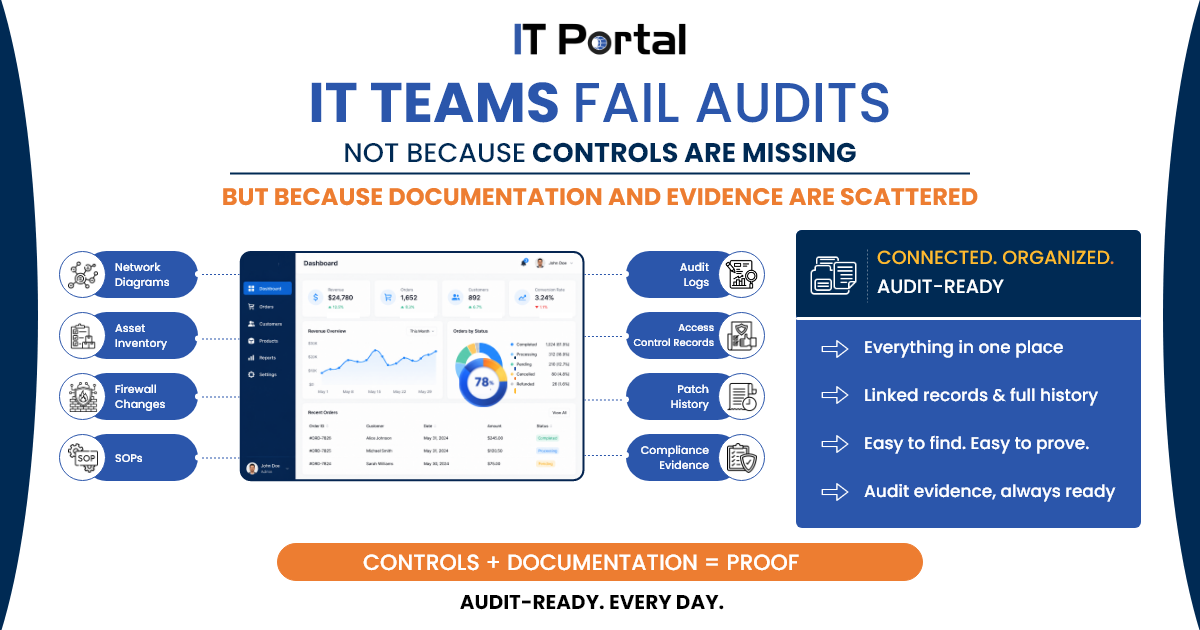
Auditors consistently ask for the same things. The most common documentation gap is the lack of a single source of truth.
Most teams think they're ready until auditors ask for firewall changes from Q2, only to discover documentation lives in email threads, tribal knowledge, or outdated folders.
Key items auditors expect to see:
- Current network diagrams and system inventories
- Access control lists and credential records
- Change history and configuration documentation
- SOPs for critical processes
- Audit logs and review records
IT Security Audit Checklist: Core Controls
Asset Management
- Verify all servers, workstations, cloud assets, and SaaS applications are inventoried
- Identify asset owners
- Classify critical systems
Access Controls
- Review privileged accounts
- Verify MFA enforcement
- Remove inactive accounts
- Validate least-privilege permissions
Change Management
- Review recent infrastructure changes
- Verify approval workflows
- Confirm rollback procedures exist
Backup & Disaster Recovery
- Validate backup success rates
- Review recovery test results
- Verify RPO and RTO requirements
Compliance-Specific Checklists
SOC 2: Map controls to Trust Services Criteria, maintain evidence of policies, and document monitoring activities.
HIPAA: Focus on technical safeguards (45 CFR § 164.312), PHI access controls, and audit logging.
CMMC: Address NIST SP 800-171 practices, CUI handling, and ESP requirements.
ISO 27001: Maintain your Statement of Applicability and Annex A controls.
PCI-DSS: Document cardholder data environment, quarterly scans, and penetration testing results.
Common IT Audit Failures
- Outdated or missing documentation
- Inconsistent access controls
- Poor change management records
- Inadequate logging and monitoring
- Lack of evidence for reviewed controls
Most findings stem not from missing technology, but from the inability to prove controls are working.
30-Day Audit Prep Timeline
Week 1: Documentation Inventory
- Update network diagrams
- Review asset inventory
- Export access control lists
Week 2: Control Validation
- Test backups
- Verify MFA coverage
- Review patch compliance
Week 3: Gap Remediation
- Fix critical findings
- Update SOPs
- Review logging coverage
Week 4: Audit Readiness Review
- Collect evidence
- Run mock audit
- Final stakeholder review
Cloud and SaaS Audit Checklist
Most organizations now operate hybrid or cloud-first environments. Auditors increasingly evaluate cloud governance alongside traditional infrastructure controls.
Cloud-specific audit items include:
- IAM role reviews
- Privileged access monitoring
- SaaS application inventory
- SSO and MFA enforcement
- Cloud logging retention
- Backup validation
- Third-party vendor assessments
- Data residency verification
The Real Problem Checklists Miss
An IT audit checklist gets you through the audit. A strong documentation system keeps you audit-ready year-round.
Audit failure is rarely about missing controls - it's about the gap between having controls and being able to prove them.
This documentation debt shows up as:
- You patch servers but can't show patch history
- You enforce MFA but can't prove when it was enabled
- You review access but the review isn't documented
The solution is a system that helps teams document as they work, with change history, audit logs, credential tracking, and centralized evidence records.
For MSPs: Managing Audit Prep Across Multiple Clients
MSPs face an additional layer of complexity: audit preparation has to happen across many client environments at once, often on different timelines and to different standards.
Common challenges include:
- Managing audit evidence across multiple clients
- Keeping client documentation consistent
- Proving access reviews and change records faster
- Reducing last-minute evidence gathering across accounts
- Standardizing audit preparation across client environments
Without a centralized approach, each client engagement becomes its own scramble - and the time spent searching for evidence multiplies with every account.
How IT Portal Supports Audit Preparation
When auditors request evidence, IT teams often spend hours searching emails, spreadsheets, and disconnected systems.
IT Portal helps teams centralize documentation, track version history, organize assets and credentials, and keep records easier to retrieve when audit evidence is requested. With IT Portal, teams can:
- Maintain version-controlled SOPs and documentation
- Track configuration changes with historical records
- Store credential and access information securely
- Generate audit evidence faster from a centralized repository
- Link assets, vendors, systems, and procedures for complete traceability
Example 1: When an auditor requests six months of server patch history, teams can retrieve documented records from a centralized source instead of manually collecting evidence from multiple systems.
Example 2: When an auditor requests proof of an access review, the team can show who reviewed it, when it was reviewed, and what changed as a result - without digging through old emails or spreadsheets.
Conclusion
An IT audit checklist helps you survive the audit. Strong, structured documentation keeps you audit-ready every day.
Your IT audits become far more effective and less stressful when every control is backed by clean, structured documentation.
Ready to move from audit panic to audit confidence? See how IT Portal helps IT teams stay audit-ready year-round.
Frequently Asked Questions
Most organizations perform annual audits, while regulated industries may require quarterly reviews of specific controls.
Network diagrams, asset inventories, access control records, change logs, security policies, and incident response documentation.
An IT audit evaluates compliance and controls, while a security assessment focuses on identifying vulnerabilities and security risks.
Internal audits typically take 2–6 weeks depending on environment complexity and documentation readiness.
Missing documentation, incomplete evidence, weak access reviews, and poor change management processes.


