What you’ll gain from this post
A clear, practical guide to choosing the right PSA tools for MSPs, implementing without common pitfalls, and scaling operations effectively. You'll walk away with a decision framework - and a clear picture of how the right PSA, paired with strong documentation, drives real profitability.
Most MSPs don't struggle with tools. They struggle with disconnected operations.
Picture this: you're managing 60+ clients, fielding hundreds of tickets a week, and still manually chasing down billable hours at month-end. Your technicians are context-switching between five systems. Your invoices go out late - or worse, inaccurate. And you have no clean view of which clients are actually profitable.
That's not a staffing problem. That's an infrastructure problem.
As MSPs grow, complexity compounds fast: more tickets, more recurring contracts, more coordination across technicians, and more tools that don't talk to each other. PSA for MSP - Professional Services Automation software - brings all of that into one operational platform. It's how scaling MSPs move from reactive chaos to a repeatable, profitable service delivery engine.
This post goes beyond the basics. You'll get a practical framework for choosing, implementing, and scaling MSP PSA software - plus clarity on how the right PSA integrates with your documentation layer to unlock real efficiency.
What is PSA for MSP?
PSA for MSP stands for Professional Services Automation software designed specifically for managed service providers.
In simple terms, it is the operational backbone that automates and connects the core business processes every MSP relies on:
- Service delivery - ticketing, SLA tracking, and escalation management
- Resource management - technician scheduling, workload balancing, and time tracking
- Billing and invoicing - recurring revenue, contract management, and project billing
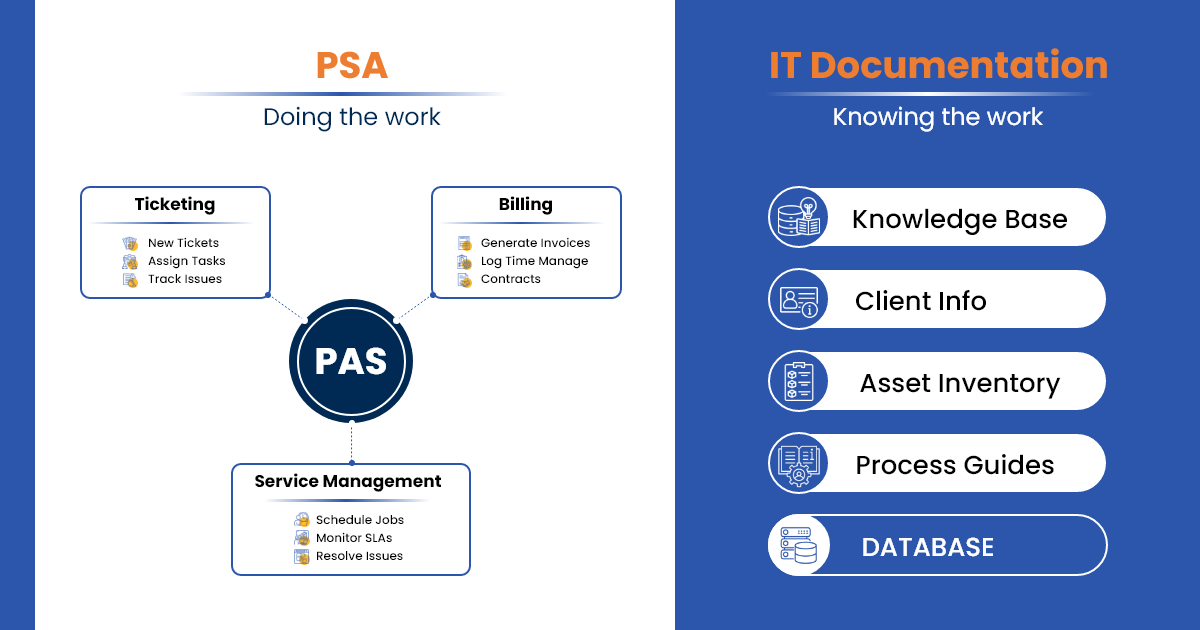
How PSA differs from other tools
| Tool | Primary Function |
|---|---|
| RMM | Monitors and manages endpoints (the technical layer) |
| CRM | Handles sales pipeline and marketing (pre-sale) |
| PSA | Runs post-sale service delivery, billing, and operations |
| IT Documentation | Provides the single source of truth for configs, assets, and procedures |
PSA and IT documentation aren't competing tools - they're complementary layers. Documentation gives your PSA the context it needs to operate accurately and efficiently.
Why MSP Operations Break Without PSA
Benefits matter, but so does understanding what goes wrong when MSPs try to scale without a proper service delivery system.
Without PSA, most MSPs run into the same walls:
- Missed billable hours - Time gets logged inconsistently or not at all. At 50+ clients, even small gaps compound into significant revenue leakage every month.
- Inconsistent SLAs - Without automated tracking and escalation, high-priority tickets fall through the cracks. Clients notice before you do.
- Zero profitability visibility - You're billing clients but have no clean data on which contracts are profitable, which technicians are overloaded, and which services are dragging margins.
- Manual billing errors - Month-end becomes a reconciliation nightmare. Invoices go out late, wrong, or both - damaging cash flow and client trust.
- Technician coordination failures - With no centralized view of workload, some technicians are buried while others are underutilized. Response times suffer.
The larger the client base, the more these gaps cost - in revenue, in retention, and in team burnout.
Key Features That Actually Matter in PSA Tools
Look beyond generic feature lists. The features that deliver the biggest impact are:
- Ticketing & SLA management
- Time tracking & billing automation
- Contract & recurring revenue management
- Reporting & analytics
- Integrations (especially with RMM and IT documentation platforms)
These features turn PSA from a ticket system into a true business operating system.
Top PSA Solutions in 2026 (With Strategic Positioning)
| PSA Tool | Best For | Key Strength | Best When Paired With |
|---|---|---|---|
| ConnectWise PSA | Scaling MSPs | Mature feature set and reporting | Strong RMM + documentation |
| Autotask PSA | Mid-market MSPs | Excellent automation and workflows | Documentation for asset visibility |
| HaloPSA | Growing MSPs | Modern interface and flexibility | IT documentation for faster resolution |
Choose based on your current size, growth trajectory, and integration requirements - especially how well the PSA connects to your documentation system. A PSA running on incomplete or siloed data will underperform regardless of which platform you choose.
How to Choose the Right PSA for Your MSP (Decision Framework)
Follow this four-step process:
- Define your business goals (growth targets, service mix, profitability targets).
- Map your current workflows and identify the biggest friction points.
- Identify your integration needs (RMM, documentation, accounting).
- Evaluate scalability and total cost of ownership.
PSA Implementation: What Goes Wrong (and How to Avoid It)
Most PSA failures aren't tool failures. They're preparation failures.
Poor data migration - Old tickets, expired contracts, and incomplete client records slow down adoption and create billing errors from day one. Audit your data before migration, not after.
Skipped team training - Technicians who don't understand the system work around it. Inconsistent time tracking, ticket misuse, and low adoption will follow. Build training into the implementation timeline, not as an afterthought.
Over-customization - The temptation to replicate every nuance of your old process in the new system leads to complexity that no one maintains. Simplify workflows first. Customize only what matters.
Forcing old processes into new tools - The biggest mistake. Map and simplify your workflows before setup. Use implementation as an opportunity to fix broken processes, not preserve them.
Implementation success depends more on preparation and process alignment than on the platform itself.
Integrating PSA with Your MSP Stack (Critical Section)
The real power of PSA shows when it connects seamlessly with the rest of your stack.
The core workflow:
Ticket created → Documentation layer provides config, asset, and procedure context → Technician resolves faster → Time logged automatically → Invoice generated accurately
Key integrations to prioritize:
- RMM tools (for asset and alert data)
- IT documentation platforms (for configs, procedures, and asset details)
- IT Asset Management (ITAM) for license and warranty visibility
The underlying principle: PSA is only as good as the data it pulls.
Think of it this way - your IT documentation platform is the context layer: accurate configs, asset records, SOPs, and client-specific procedures. Your PSA is the execution and billing layer: routing, tracking, and invoicing based on that context.
When these two layers are disconnected, technicians waste time hunting for information, tickets take longer to close, and billing errors creep in. When they're connected - through a platform like IT Portal - every ticket is backed by accurate, up-to-date context, and every invoice reflects actual work delivered.
That connection is what makes PSA integration with documentation a competitive advantage, not just a technical convenience.
Measuring ROI of PSA Software
Track these four metrics to prove value:
- Technician utilization rate
- Ticket resolution time
- Billing accuracy
- Revenue per client
Consistent improvement in these numbers shows your PSA investment is paying off.
Future Trends in PSA for MSPs
- AI-driven automation for ticket routing and resolution suggestions
- Predictive analytics for resource planning and churn prevention
- Deeper integrations across the entire MSP stack
- Unified MSP platforms that combine PSA, RMM, and documentation in one place
The Bottom Line
PSA for MSP is not just another tool - it is the core operational system that drives MSP growth.
Choosing the right one and implementing it correctly can transform how you deliver services, bill clients, and scale your business.
But here's what separates good PSAs from great ones: the quality of data they operate on.
Your PSA becomes 10× more powerful when it operates on top of clean, structured documentation. That's where IT Portal comes in—providing the single source of truth that makes your PSA smarter, faster, and more profitable.


