You just wrapped a QBR. The client is happy. Then you reconcile the endpoint count against the invoice.
You're managing 53 endpoints. You're billing for 47.
That's a $6,000+ annual billing mismatch - and it's not a one-time mistake. It's a structural leak that widens every billing cycle, silently, until someone audits it.
Asset drift is an infrastructure problem, not a technician error. Devices are deployed, repurposed, and retired constantly across client portfolios. Without a systematic process, the gap between what you manage and what you bill grows on its own.
This guide shows you how to close that gap permanently - and why the best MSP asset management starts with a purpose-built documentation platform like IT Portal.
What MSP Asset Management Really Means
MSP asset management is the systematic process of tracking every asset across your managed client portfolio: hardware, software, licenses, configurations, and dependencies.
A spreadsheet of device names and IPs is not asset management, because it decays immediately. True asset management captures the full lifecycle: procurement, deployment, configuration, change history, warranty, retirement.
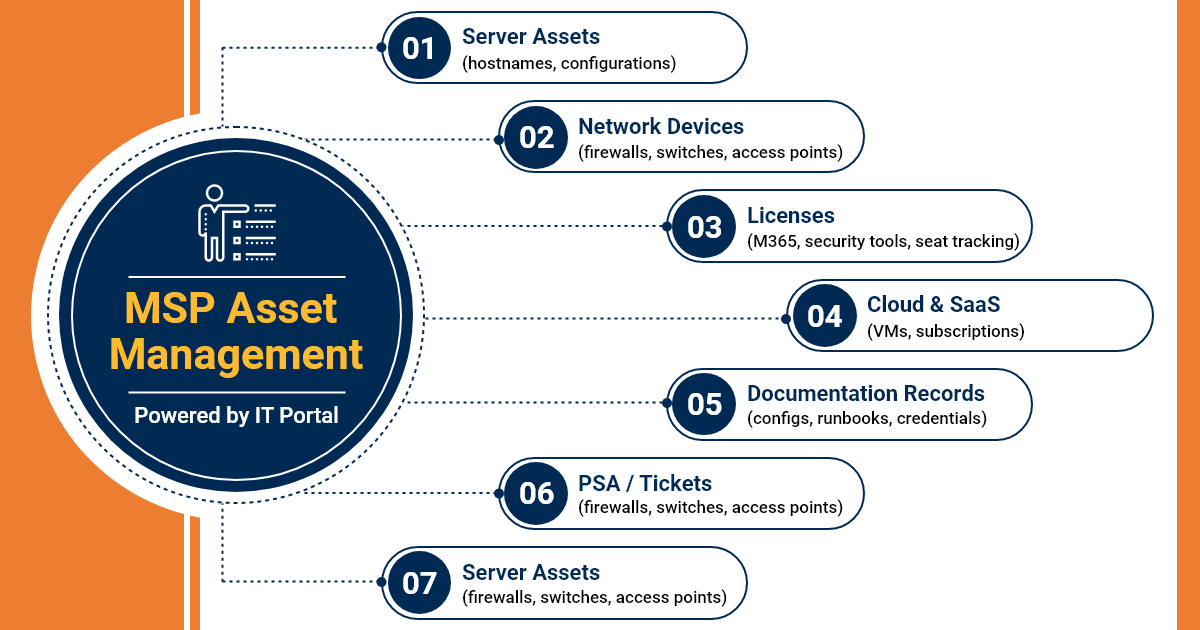
What counts as a managed asset:
- Hardware: Servers, workstations, laptops, networking equipment, printers, and IoT devices.
- Software: Installed applications, OS versions, and patch levels.
- Licenses: Microsoft 365, Adobe, security tools - seat counts, expiry dates, assignments.
- Cloud assets: VMs, cloud storage, SaaS subscriptions, and hosted services.
- Network assets: Switches, routers, firewalls, access points with configuration state.
- Warranties and contracts: Hardware warranties, vendor support agreements, and renewal dates.
How it Differs from Internal IT
Internal IT manages one environment with relatively stable asset counts. MSPs manage dozens or hundreds of client environments simultaneously. Each client has its own asset population, lifecycle, and billing relationship. MSP scale and multi-tenancy make systematic asset management non-negotiable.
Why MSP Asset Management Is a Revenue & Business Continuity Issue
The direct revenue impact of untracked assets
Every untracked endpoint, license seat, or cloud instance is an unbilled unit. An MSP managing 500 endpoints with a 5-10% tracking gap can be under-billing by tens of thousands annually. Asset drift accelerates during client growth phases - devices deployed, billing never updated. The leak is invisible until someone audits it and most MSPs don't.
Warranty and license expiry as hidden cost multipliers
- Expired warranties = emergency hardware replacement at full cost with no lead time.
- Unlicensed software in client environments = compliance liability the MSP may inherit.
- License over-provisioning = MSP or client paying for seats nobody uses.
Asset records as the foundation of accurate service agreements
MSAs are priced against a defined scope of assets. When scope drifts, pricing becomes inaccurate. Clients adding assets without notification shift workload without contract adjustment. Documented asset records are the baseline for scope reviews, upsell conversations, and renewals.
Operational risk beyond revenue
- Untracked assets don't appear in patch workflows. They run unpatched and become security liabilities.
- Undocumented assets may not be included in backup jobs. Nobody knows until data is lost.
- Incident response is slower and more expensive without complete asset records.
- Monitoring agents and security tools can't cover what they don't know exists.
Common Asset Management Challenges Without the Right System
Asset Discovery vs. Asset Documentation
RMM tools discover devices, but discovery is not documentation. A discovered device without a documented record is a data point, not a managed asset. The gap between what the RMM sees and what is documented is where revenue leakage lives.
The Multi-Client Sprawl Problem
30 clients = 30 separate asset populations evolving independently. Without a multi-tenant platform, tracking is done in disconnected spreadsheets and RMM views. Cross-client visibility (total endpoints, upcoming license expirations) is impossible without centralization.
Asset Lifecycle Blind Spots
- Procurement without documentation: New assets deployed before they're recorded.
- Repurposed hardware: Old documentation carried forward, never updated.
- Retired assets: Decommissioned devices left in records, inflating managed counts and creating ghost billing (charging for non-existent assets).
- Client-owned shadow assets: Devices the MSP is implicitly managing, but never formally documented.
The Spreadsheet Ceiling
Spreadsheets work for one client at one point in time. Across 20+ clients over 12+ months, you get version conflicts, outdated entries, and no audit trail — with a false sense of control because the spreadsheet exists.
Every growing MSP hits the manual tracking ceiling. The question is when, not if.
Key Features to Look for in Asset Management Software for MSPs
Multi-Tenant Asset Architecture with Client-Level Isolation
- Client → site → asset hierarchy with custom fields per asset type.
- Client data fully isolated - no cross-client data bleed.
- Cross-client reporting: aggregate views for capacity planning, license audits, revenue reconciliation.
- Role-based access: Clients see their own records only.
Full Asset Lifecycle Tracking - From Procurement to Retirement
- Procurement records: Purchase date, vendor, cost, assigned client, warranty term.
- Configuration state: How the asset is configured, what it connects to, what depends on it.
- Change history: Every modification logged with timestamp and author.
- Retirement workflow: Formal decommission process that removes assets from active billing scope.
License and Warranty Management Built into Asset Records
- License seat tracking linked directly to asset records, not a separate spreadsheet.
- Configurable expiry alerts: Warranty renewals, license expirations, support contract end dates.
- License reconciliation: Deployed seats vs. purchased seats, surfaces both gaps and over-provisioning.
- Vendor and contract records linked to assets for fast reference.
RMM and PSA Integration That Closes the Discovery-to-Documentation Gap
- RMM integration pushes discovered assets into the documentation platform.
- PSA integration links asset records to tickets, contracts, and billing line items.
- Bi-directional sync eliminates drift between what's managed and what's invoiced.
- Integration depth matters more than integration count.
Reporting and Audit Capabilities for QBRs and Contract Management
- Asset count reports by client, site, device type, and billing category.
- License compliance reports: licensed vs. deployed vs. gap.
- Warranty expiry forecasts for proactive hardware refresh planning.
- Change audit logs for security reviews, compliance audits, and incident investigations.
Best Practices for MSP Asset Management That Closes the Revenue Gap
Establish an Asset Baseline at Every Client Onboarding
- Formal asset discovery before service delivery begins, not after the first incident.
- Baseline documentation defines contract scope: what's managed, what's billed, what's the starting point.
- Use discovery tools to surface unknown assets, document everything found.
- Sets the evidentiary baseline that protects the MSP in scope and billing disputes.
Build Asset Changes into Service Delivery Workflows
- New device deployments trigger a documentation step before the ticket closes.
- Hardware replacements: retired asset decommissioned, new asset fully documented, no orphaned records.
- Client-initiated changes flow through a formal asset intake process.
- Change management and asset management are the same workflow.
Run Quarterly Asset Audits Against Billing Records
- Compare documented asset counts against billed service counts every quarter.
- Identify two drift categories: assets managed but not billed (revenue leakage) and assets billed but not in environment (overcharging risk).
- Use findings as the basis for contract scope reviews and upsell conversations.
- Document the audit itself: when run, what found, what corrected.
Define Asset Ownership and Documentation Accountability by Role
- Asset documentation owned by role, not individual, survives staff turnover.
- Deployment technician documents new assets; account manager reviews records; operations lead audits.
- Required fields and documentation checklists enforce accountability at the platform level.
- Build asset documentation completion into technician performance metrics.
How IT Portal Solves MSP Asset Management at the Platform Level
Structured Asset Records That Connect to Everything Else
- Server record links to network documentation, backup config, credentials, runbooks, billing association.
- Connected structure makes records operationally useful, not just a registry.
- Standalone asset tracking tools track presence, not context.
Automation That Keeps Asset Records Accurate Without Manual Effort
- RMM integration surfaces newly discovered devices as documentation tasks automatically.
- Change triggers: Ticket modifying an asset prompts documentation update before closure.
- Scheduled review reminders based on last-modified timestamps surface stale records proactively.
- License and warranty expiry alerts fire before the deadline.
Multi-Client Asset Visibility at the Portfolio Level
- Cross-client dashboards: total managed assets, license expiry timelines, warranty forecasts.
- Per-client asset reports ready for QBR presentations without manual compilation.
- Client-level isolation with portfolio-level visibility, built for MSP scale.
The Integration Layer That Connects Asset Records to Revenue
- PSA integration links documented assets to contract line items.
- New asset documentation can trigger a PSA workflow to flag contract for scope review.
- Eliminates the manual reconciliation step most MSPs skip or run infrequently.
- This is where recurring revenue recovery actually happens.
Benefits of MSP Asset Management
Recovered Revenue from Accurate Billing Reconciliation
- First formal asset audit against billing records reveals immediately recoverable revenue.
- No new clients required, recovery comes from accuracy, not growth.
- Ongoing accuracy prevents the gap from reopening; asset management becomes revenue protection.
Reduced Operational Cost Through Proactive Lifecycle Management
- Warranty alerts eliminate emergency hardware replacements at premium cost.
- License reconciliation eliminates over-provisioning spend.
- Proactive hardware refresh planning based on warranty and age data reduces unplanned downtime.
Stronger Client Relationships Built on Documented Accountability
- QBR reports with accurate, current asset data signal a different level of MSP professionalism.
- Transparent asset records reduce disputes over scope, billing, and responsibility.
- "What are you managing for us?" answered instantly, accurately, and with documentation.
Security and Compliance Posture Built on Complete Asset Visibility
- Complete asset records = complete patch coverage, backup coverage, monitoring agent deployment.
- SOC 2, HIPAA, CMMC require documented asset inventories, accurate records are the audit foundation.
- Unknown assets = unmanaged attack surface. IT asset management for MSP is infrastructure-level security hygiene.
Building an MSP Asset Management Practice That Scales
The Asset Management Maturity Stages for MSPs
- Stage 1 - Reactive: Assets documented after incidents; billing reconciliation manual and infrequent.
- Stage 2 - Structured: Templates and onboarding checklists exist; new assets documented at deployment; annual audits.
- Stage 3 - Integrated: RMM and PSA integrations keep records current; quarterly audits standard; reconciliation near-automated.
- Stage 4 - Strategic: Asset data drives QBR conversations, contract renewals, and hardware refresh planning; asset management is a client-facing value proposition.
When to Evaluate Asset Management Software for MSPs
- Spreadsheet ceiling: Asset tracking requires more manual effort than it delivers value.
- Client portfolio growth: Informal tracking breaks down at a different point for every MSP, but it always does.
- Revenue audit trigger: A billing reconciliation gap is the clearest signal the current approach isn't working.
- Compliance requirement: Client industries requiring documented asset inventories make informal tracking a legal and contractual exposure.
What to Look for When Evaluating Platforms
- Does the asset hierarchy match how the MSP thinks about clients - by site, device type, service tier?
- How deep is the RMM and PSA integration, does it close the discovery-to-billing gap or just sync names?
- Can the platform generate QBR-ready reports without manual compilation?
- What is the migration path from the current system and does the vendor support it?
The Bottom Line
Untracked assets aren't just a documentation problem, they're a direct, recurring revenue leak that grows silently every billing cycle. Most MSPs don't discover the gap until a QBR or audit forces the conversation and by then, tens or hundreds of thousands have already slipped away.
The best MSP asset management practice turns every device, license, and cloud instance into accurate, billable reality. With the right system, you close the drift, recover revenue, protect SLAs, reduce operational risk, and build stronger client relationships, all without adding headcount or complexity.
IT Portal solves this at the platform level: hierarchical structure keeps assets organized by client and site, asset-to-license linking surfaces gaps and over-provisioning instantly, and audit-ready reporting gives you clean QBR data and compliance confidence.
Stop leaving money on the table. Strengthen your MSP asset management foundation today and start collecting the revenue you're already earning.


