Password Management
Password Management Built for IT Departments & MSPs
Secure, centralized, auditable credential management - fully integrated into your IT documentation system.
Password chaos is one of the biggest risks to any IT operation. Credentials scattered across spreadsheets, personal notes, emails, or outdated ticket comments lead directly to:
- Security exposures
- Compliance failures
- Slower troubleshooting
- Knowledge silos
- Operational bottlenecks
IT Portal solves this by delivering a purpose-built IT department password manager - not a generic consumer tool. Every credential is stored, organized, permissioned, and audit-ready inside the same system where teams document networks, assets, processes, SOPs, and configurations.
This isn't "another password tool." It is a fully integrated credential management engine designed around how MSPs and IT departments actually work.
Why IT Teams Need a Purpose-Built Password Manager
Most password managers work well for individuals or small internal teams - but they break down when used in complex IT environments.
IT teams need:
- Multi-client separation
- Role-based access
- Audit logs tied to real IT assets
- Support for shared credentials
- Integration with IT documentation
- Permissions tied to companies, sites, devices, and SOPs
- Secure storage at scale
- Technician accountability
- Fast credential retrieval inside the browser
Generic tools weren't built for this. IT Portal was.
IT Portal Password Management - Feature Overview
1. Centralized Credential Storage
Store every type of sensitive credential in one secure, structured vault:
- System logins
- Server & device credentials
- Firewall, switch, and router passwords
- VPN credentials
- Application logins
- Cloud provider accounts
- Support portal access
- Software subscriptions
- Admin-level root credentials
- Shared technician logins
- Internal application passwords
Credentials live exactly where IT techs need them - inside the documentation of each company, location, cabinet, asset, or system.
No searching. No guessing. No scattered notes.
2. Secure, Controlled Password Sharing
Share passwords with specific users, teams, or roles - without losing control.
You define who can:
- View
- Modify
- Use
- Share
- Inherit access through roles or company-level permissions
Technicians only see credentials they're authorized to access - nothing more.
Granular access control ensures:
- Least-privilege access
- Zero unnecessary exposure
- Faster onboarding for new techs
- Controlled offboarding when access must be revoked
This is how MSPs and IT departments maintain security at scale.
3. Personal Password Storage for Internal IT Teams
Not every credential belongs in a shared vault. Users often need a secure place for:
- Individual SaaS accounts
- Personal admin tools
- IT team-specific resources
- Temporary credentials
- Credential notes
IT Portal includes private password storage so every user can maintain personal credentials securely - without mixing personal and shared access.
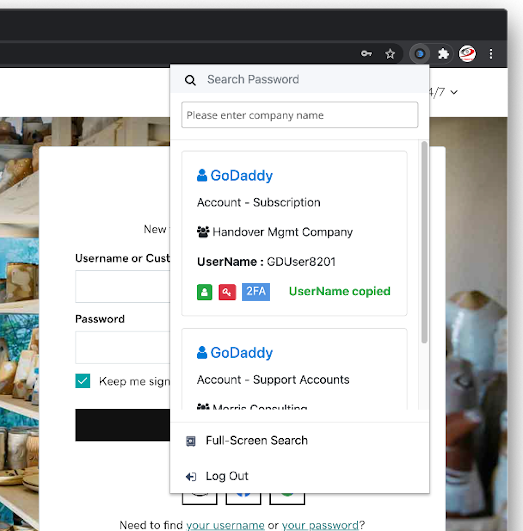
4. Lightning-Fast Browser Access (Chrome Extension)
Credential access shouldn't slow down technicians.
The IT Portal browser extension lets users:
- Auto-fill passwords
- View credentials without switching tabs
- Search across shared + personal vaults
- Retrieve credentials directly from the IT Portal
- Access permissions instantly based on role
Download for Chrome or Firefox.
5. Enterprise-Grade Security Architecture
Security is the foundation of IT Portal's password management system.
Encrypted Credential Storage
All credentials are encrypted at rest and in transit using modern encryption standards.
Role-Based Access Controls
Permissions cascade properly across:
- Companies
- Sites
- Devices
- Roles
- Team groups
Ensuring no credential is ever exposed to the wrong user.
Access Logging & Audit Trails
Every retrieval, update, or modification is logged. Auditors love it. CIOs rely on it. Security teams require it.
6. Built-In Reporting & Auditing
Security and compliance require visibility. IT Portal provides:
- Password access logs
- Change history
- Permission reports
- Shared credential visibility
- Client-level access breakdown
- Technician activity logs
- Exportable audit trails for compliance frameworks (ISO, SOC 2, NIST, CIS, PCI, HIPAA, etc.)
This transforms password management from a risk into a compliance advantage.
7. Seamless Integration with Entire Documentation Ecosystem
A password is not useful in isolation. IT Portal unifies credentials with:
- Device documentation
- Network diagrams
- Standard operating procedures
- Application inventories
- Configuration notes
- Client onboarding data
- RMM/PSA integrations
- Knowledge base articles
This makes IT Portal dramatically more useful than standalone tools like LastPass or 1Password.
For every asset, SOP, or system you document - the right credentials are available instantly.
How IT Portal Outperforms Other IT Password Managers
Competitors and standalone vaults focus on storing passwords. IT Portal focuses on operational efficiency.
| Capability | IT Portal | Others |
|---|---|---|
| Operational Integration | Passwords embedded in entire IT documentation structure | Passwords exist in isolated vaults |
| Technician Workflow | Faster access + browser plugin + context-aware retrieval | Slow switching between tools |
| Multi-Client Management | Designed for MSP hierarchy (companies → sites → assets) | Require workarounds |
| Audit & Compliance | Logs tied to documentation + assets | Logs exist separately from IT operations |
| Onboarding & Offboarding | Permissions cascade automatically based on team role | Require manual permission assignment |
| Ease of Use | Fast, visual, hierarchical, built for IT teams | Overly complex, unintuitive, or consumer-oriented |
Why IT Departments Trust IT Portal for Password Management
Built for MSPs and Internal IT - Not Just End Users
Most password managers are designed for end users. IT Portal is designed for complex IT environments.
Eliminates Technician Guesswork
Credentials are stored where they belong - no outdated spreadsheets or mystery passwords.
Improves IT Operations
Troubleshooting becomes faster when passwords and documentation live together.
Strengthens Security
No more emailing credentials or storing them in shared notes.
Improves Documentation Culture
Makes standardization easier for teams and new hires.
Use Cases for IT Portal Password Management
- MSPs managing hundreds of client environments
- Internal IT teams needing structured access
- Security teams requiring audit visibility
- Helpdesk needing fast credential retrieval
- Compliance teams needing logs and documentation alignment
- CIOs / IT managers wanting reduced risk exposure
- Teams eliminating spreadsheets, notes, or shared files
Frequently Asked Questions
What is IT Portal's password management feature?
IT Portal provides a centralized, secure, role-based password management system built specifically for IT departments and MSPs. It stores shared and personal credentials, controls access, and integrates with IT documentation.
How is IT Portal different from consumer password managers?
Generic password tools store credentials in isolation. IT Portal embeds passwords into your entire IT documentation ecosystem, aligning them with companies, devices, SOPs, and configurations.
Can multiple technicians share passwords securely?
Yes. IT Portal allows controlled sharing with precise permissions and full audit trails.
Does IT Portal support private credentials?
Yes. Each user gets a personal password vault separate from shared IT credentials.
Is the browser extension secure?
Absolutely. Authentication is tied to IT Portal permissions, and all data is encrypted while transmitted and stored.
Is this suitable for MSPs managing multiple clients?
Yes - IT Portal is built around multi-client hierarchy (companies → sites → assets), making it ideal for MSP environments.
Can I audit who accessed which passwords?
Yes. Every password view, edit, and share action is logged for compliance.
Download the Chrome Extension - Start Managing Passwords Efficiently
Stop searching for credentials, risking security breaches, or relying on scattered spreadsheets.
With IT Portal's password manager, your team gets immediate access to credentials, fully controlled permissions, compliance-ready auditing, a lightning-fast workflow, and seamless integration with your IT documentation - all directly inside the browser.
Download the IT Portal Chrome Extension and experience secure, efficient password management where your team works.

