Quick Summary
Most IT audits fail not because teams are careless, but because documentation doesn't match reality. Unknown devices, undocumented connections, and fast-changing hybrid infrastructure create blind spots auditors uncover immediately. Network mapping software closes that gap by auto-discovering real infrastructure. IT Portal turns those maps into structured, searchable, audit-ready documentation—without relying on spreadsheets or tribal knowledge.
Why do IT infrastructures fail audits? Is it due to misconfigurations or mismatched ground reality? Unknown devices, undocumented connections, and shadow networks expose the biggest risk. Network mapping tools eliminate that blind spot by auto-discovering everything your team didn't even know to document. Audit failures happen when documentation doesn't match reality. Your team maintains a spreadsheet showing x servers, but the auditor discovers x+10. This isn't incompetence, but the natural result of documenting IT processes manually in complex environments. Hybrid infrastructure, such as on-premises data centers, cloud resources, and remote sites, makes the problem worse. Rapid change makes manual record updates in Excel increasingly difficult for teams to maintain. A robust network mapping software solves this challenge by showing the real, current state of your environment. This post discusses a practical system for building an audit-ready IT infrastructure using network mapping tools and proper IT operations documentation.
What is Network Mapping Software and Why is it Significant for Audits?
Network mapping software automatically discovers, visualizes, and tracks your infrastructure in real time. It answers audit-critical questions:
- What devices exist?
- Where are they located?
- How are they connected?
- Which systems handle sensitive data?
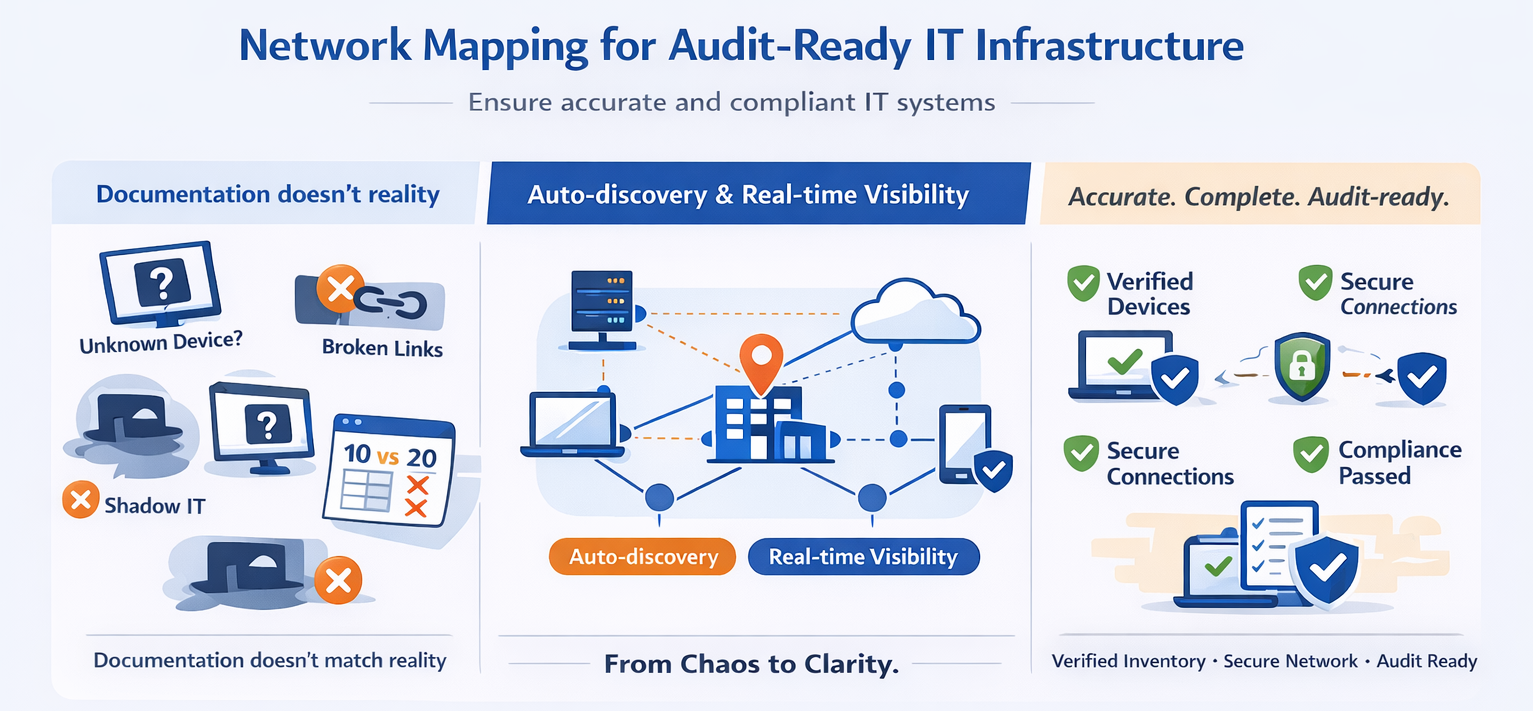
Types of Network Maps Generated
- Physical maps (Layer 1/2): Physical network maps (Layer 1/2) show hardware locations and cable connections. This includes hardware locations, racks, switches, and cabling.
- Logical maps (Layer 3): Logical network maps display how data flows between systems. They include IP flows, routing paths, and VLANs.
- Cloud maps: Cloud network maps show how resources, such as VMs, storage, and databases, are organized and connected within public/private cloud platforms like AWS, Azure, and GCP. Security-focused maps show network topology with security elements highlighted to map risks and data paths for sensitive information. VMs, storage, databases across AWS, Azure, GCP
- Security maps: These include firewalls, segmentation zones, data paths.
- Functional and application maps: These show how specific applications and their traffic move across the physical and logical network.
Significance of Network Mapping Software
Network mapping software automatically discovers and visualizes your IT infrastructure. It scans your environment, identifies every device, and shows how they connect. The result is a complete picture of your network topology, dependencies, and communication paths. Here's why thy are significant.
- Compliance: Compliance frameworks require accurate infrastructure documentation. SOC 2 requires you to know which systems process customer data. ISO 27001 requires asset inventories and information flow diagrams. HIPAA mandates documentation of systems handling protected health information. PCI DSS requires network segmentation diagrams showing cardholder data environments. CMMC requires comprehensive asset management.
- Closing documentation gaps: Most IT teams and MSPs face a documentation gap. They know roughly what's on their network, but they lack precise, validated records. Manual documentation falls behind. When audit time comes, teams scramble to create diagrams that should have existed all along. Network mapping closes this gap. It provides the foundation for reliable IT documentation process workflows.
How Network Mapping Improves Documentation Accuracy
Network mapping tools eliminate human memory and manual updates from the equation. Here are the key improvements in terms of documentation accuracy.
- Always-current diagrams: This produces accurate diagrams. The software identifies connections between devices and generates visual representations automatically. New server deployed? Map updates automatically.
- Relationship & dependency tracking: This reduces audit surprises and helps you identify the dependencies of applications on databases, services on network segments, and communication systems with external resources. Applications, databases, identity services are all clearly linked.
- Rogue device detection: Every network has devices that shouldn't be there. For instance, an old contractor's laptop may still be connected to the VPN. This finds devices auditors will otherwise discover first.
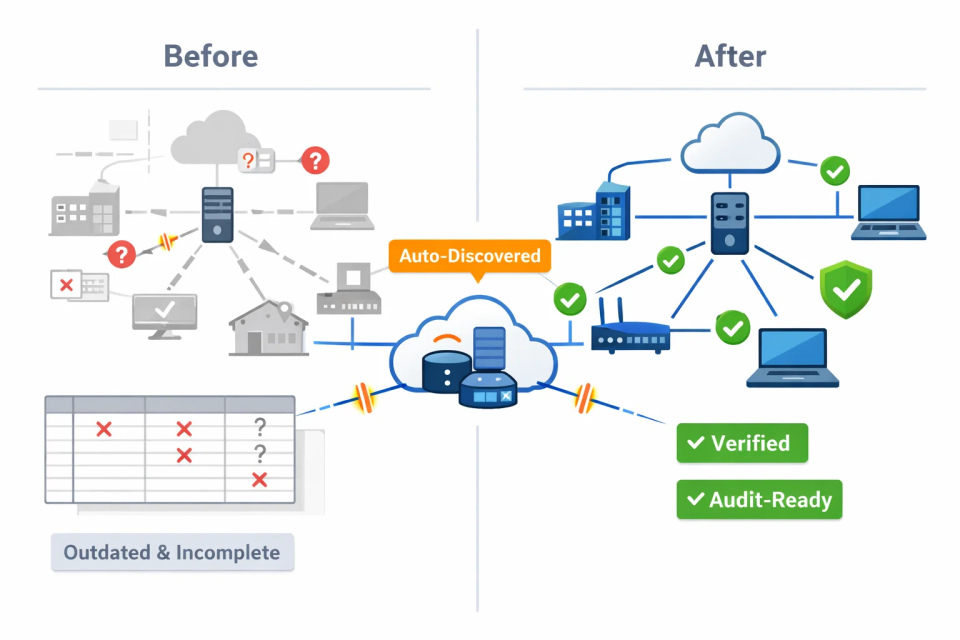
Step-by-Step: Using Network Mapping Software to Prepare for an Audit
Here are some steps for using a network mapping software for audit preparation.
1. Automatically Discover Every Asset
- SNMP for network devices
- WMI for Windows systems
- SSH for Linux servers
- Cloud APIs for AWS & Azure
- Goal: No blind spots.
2. Close Hybrid & Remote Gaps
- Ensure cloud API access is enabled
- Deploy scanners at remote sites
- Validate VPN discovery paths
- Auditors will ask: How do you know nothing was missed?
3. Validate and Classify Assets
- Assign roles (web server, DB, firewall)
- Identify owners and responsible teams
- Flag audit-relevant systems
- Classify by site → rack → device
- This creates repeatable documentation workflows.
4. Map Communication Paths & Dependencies
- Server-to-database flows
- Identity service dependencies
- External connections
- Encryption gaps and segmentation issues
- This is essential for PCI segmentation validation.
5. Compare Maps to Documentation
- Identify mismatches immediately
- Update documentation based on reality
- Eliminate outdated diagrams permanently
6. Maintain an Ongoing Audit Trail
- Continuous scanning
- Change logs for new, removed, or altered assets
- Alerts when infrastructure changes
- Auditors expect controlled, documented change management.
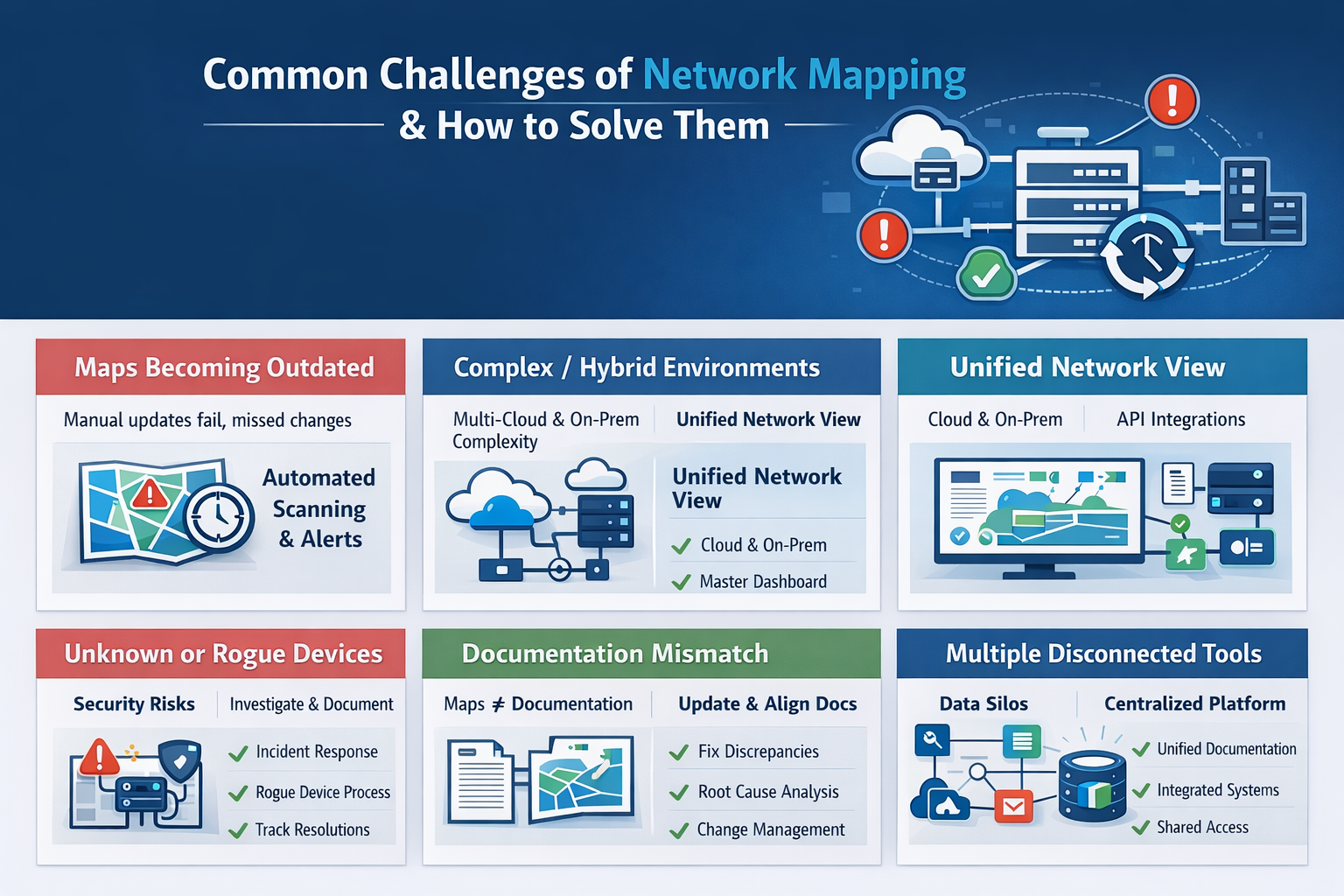
Common Challenges of Network Mapping and How to Solve Them
Here are some common challenges of network mapping and their solutions.
-
Maps Becoming Outdated: Manual updates fail and employees may miss on crucial information.
-
Solution: Schedule automated scanning, such as daily scans for critical environments, and weekly for stable infrastructure. Configure IT Portal integrations to pull updated data automatically. Set alerts for when maps haven't been refreshed on schedule.
-
Complex or Hybrid Environments: Multi-cloud plus on-premises creates scanning complexity.
-
Solution: Use mapping tools with cloud API integrations. Deploy scanning agents in each environment. Create a master view in the network mapping tool that consolidates all sources. Document what each scanner covers so nothing falls through gaps.
-
Unknown or Rogue Devices: Every network has them.
-
Solution: Treat unknown devices as security incidents. Investigate immediately. Document your process for handling rogue device discovery. Use the software to track investigations and resolutions. This turns a compliance problem into documented security management.
-
Documentation Mismatch: Maps show one thing, documentation says another.
-
Solution: Update your IT operations documentation to match reality, then investigate why the mismatch occurred. Fix the root cause, such as inadequate change management.
-
Using Multiple Tools: Different tools for discovery, documentation, ticketing, and monitoring create information silos.
-
Solution: Centralize documentation in the software so it can be referenced by network mapping tools, ticketing systems, and monitoring alerts, and so on.
Real-World Example: The Cost of Missing Documentation
Before mapping
- MSP documentation shows 42 devices
- Audit discovers 51
- Engagement delayed
- Emergency remediation required
After mapping + centralized documentation
- 100% asset visibility
- Unknown devices identified early
- Audit passed without findings
- Prep time reduced by weeks
Tips for Getting Maximum Value from Network Mapping Tools
Here are some useful tips for optimizing the use of network mapping tools for audit readiness.
- Integrate network maps directly into documentation workflows
- Use maps as the foundation for DR diagrams
- Reference dependency maps during change approvals
- Use visual maps for engineer training
- Automate documentation refresh cycles
- Create dedicated audit folders for every client
Why IT Portal Complements Your Network Mapping Tool
Network mapping tools identify and visualize devices, but without a structured documentation system, MSPs can't turn those maps into standardized, repeatable, and audit-ready processes. This is where IT Portal becomes essential. Here is how we can help
- Converts Network Maps into Structured, Searchable Documentation: Maps plug directly into IT Portal's hierarchical system. Devices, sites, cabinets, and dependencies become organized entities. Auditors can trace every asset to its documentation source. Instead of hunting through files, you provide one comprehensive view.
- Maintains a Single Source of Credible Information for Audits: Network maps provide real-time visibility. IT Portal provides long-term documentation governance. Together, we prevent audit failures caused by outdated information. Your maps show the current state. Your documentation system maintains historical records, change logs, and approval trails.
- Enables Consistent MSP Workflows: Store SOPs, runbooks, configurations, and access controls in one place. Use maps to validate and update documentation in seconds. This prevents tribal knowledge and documentation gaps. New team members don't need to ask veterans where information lives. It's all in IT Portal, organized and searchable.
- Fast Onboarding for New Technicians: Maps show the environment. IT Portal shows the details. New engineers get fully operational faster, reducing onboarding effort and risk. They can see infrastructure topology, then drill into specific device configurations, contact information, and procedures.
- Creates an Audit-Ready Documentation Bundle: Using network maps plus IT Portal, MSPs can generate complete audit packages: asset inventories, dependency diagrams, change management records, access lists, configuration documentation, and client-ready compliance reports. Everything auditors need, in the format they expect.
Get started with IT Portal today - 30-day money-back guarantee
FAQ Section
MSPs should look for automated device discovery, dependency mapping, cloud and hybrid visibility, and integrations with documentation systems to keep infrastructure records accurate, consistent, and audit-ready without manual effort.
Yes. Network mapping software detects security risks by identifying rogue or unknown devices, unencrypted communication paths, and segmentation gaps that could expose sensitive systems during audits or security reviews.
Modern network mapping software supports hybrid environments by mapping on-premises infrastructure, cloud resources across AWS, Azure, and GCP, and remote sites using APIs and distributed scanning.
Network mapping is not mandatory, but it is practically essential for audits because compliance frameworks require accurate asset inventories, system visibility, and data flow documentation that manual methods often fail to maintain.
Yes. Network mapping reduces audit preparation time by continuously updating asset inventories, dependency diagrams, and change records, eliminating last-minute documentation work and ensuring audit evidence always reflects reality.
Network mapping supports disaster recovery planning by documenting system dependencies, communication paths, and critical infrastructure relationships, enabling teams to define accurate recovery sequences and reduce downtime during incidents.
Connect with IT Portal
Learn how to build documentation systems that stay accurate even as your infrastructure changes.
IT Portal provides documentation governance to create an audit-ready infrastructure that satisfies compliance requirements without constant manual effort. For MSPs managing multiple clients, this is essential. Ready to Eliminate Audit Surprises?
Request a demo to understand how IT Portal supports your IT operations.


