Automatically Import Devices for Effortless Network Management with Network Documentation Software
Discover, import, and document every device automatically — no spreadsheets, no guesswork.
Struggling with Outdated Network Documentation?
Manual network documentation leads to:
- Instant obsolescence: Your updates are outdated the moment they're made.
- Inefficiency: Time-consuming, repetitive tasks that introduce errors.
- Incomplete records: Leaving gaps that can lead to costly, risky decisions.
- Scalability issues: Struggling to manage documentation across multiple devices and clients.
As your devices evolve faster than spreadsheets can track, you need an automated solution that grows with your network, one that keeps your documentation accurate, up-to-date, and easy to manage.
IT Portal's Network Configuration Import: Automated Network Discovery and Documentation
IT Portal's Network Configuration Import feature automatically discovers devices on your network and creates structured documentation automatically. Whether you're managing a single office network or hundreds of client sites, this powerful feature of IT Portal ensures every device is captured, categorized, and kept current — all within one unified platform.
Traditional network configuration management requires constant manual updates. With Network Configuration Import built directly into IT Portal, you eliminate that burden entirely, gaining real-time visibility into your infrastructure without the administrative overhead.
Features of Network Configuration Import
Network Configuration Import delivers comprehensive network device management across four key areas:
-
01
Discovery & Inventory
- Automated Device Discovery: Scans your entire infrastructure, from edge devices to core switches
- Bulk Asset Creation: Auto-populates device records, reducing hours of manual data entry
- Device Metadata Capture: Automatically logs model numbers, firmware versions, IP addresses, and MAC addresses
-
02
Configuration Management
- Automatic Relationship Mapping: Visualizes network topology with device connections and dependencies
- Complete Network Inventory: Maintains accurate, current device records for operational consistency
-
03
Monitoring & Updates
- Real-Time Synchronization: Detects and documents network changes as they occur
- Scheduled Updates: Keeps documentation current as your infrastructure evolves
- Continuous Device Monitoring: Provides ongoing network visibility without separate tools
-
04
Backup & Compliance
- Configuration Backup: Tracks changes and maintains version history
- Change Audit Trail: Documents what changed, when, and by whom for compliance readiness
Key Benefits of Network Configuration Import
These benefits enhance network documentation, management, and continuous device monitoring
Centralized Management
This network documentation tool stores and manages all network configurations in one place, ensuring efficient administration.
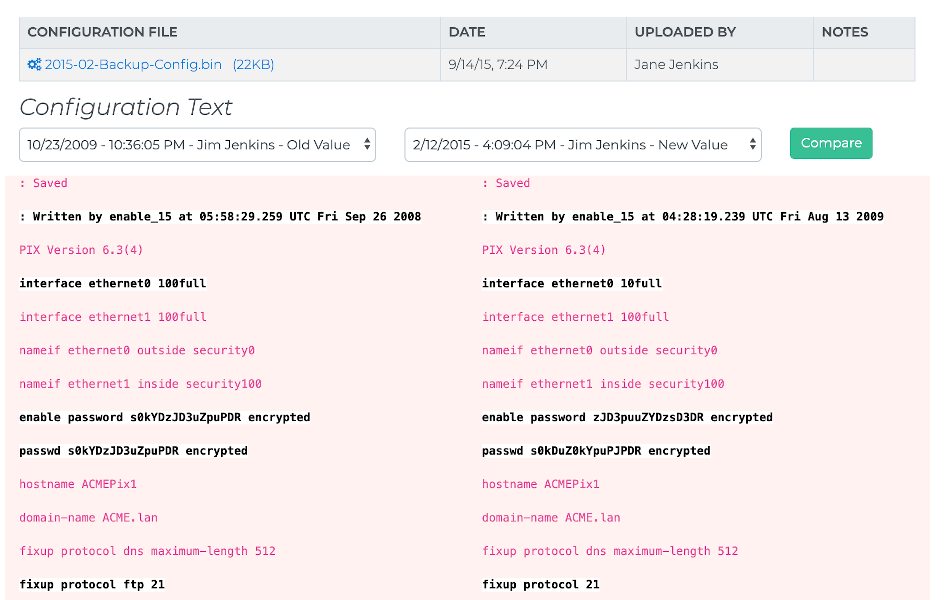
Configuration Comparison
Automatic network documentation helps you identify changes and discrepancies between configuration versions to troubleshoot issues and maintain consistency.
Change Tracking
Our network documentation tool enables automatic configuration monitoring to improve security and compliance with network change management.
Backup and Recovery
This tool automatically creates reliable backup of your network configurations to protect against data loss and ensure business continuity.
Enhanced Security & Compliance
This network documentation software enhances security with role-based access, encrypted data transmission, SOC 2 compliance, and complete audit logging for full visibility and compliance.
Complete and Scalable Network Device Management
Automatically document and manage your network with our comprehensive network documentation tool.
- Network Infrastructure: Routers, switches, firewalls, load balancers
- Endpoints: Servers, workstations, access points, printers
- Configuration Details: IP addresses, VLANs, port configurations, firmware versions
- Relationships: Network topology, device dependencies, connection mapping
With built-in configuration management features, everything stays organized and audit ready.
Built for MSPs & IT Teams
For Managed Service Providers
- Onboard new client networks in minutes instead of hours
- Scale documentation across hundreds of sites without additional overhead
- Standardize network documentation across all clients with consistent, automated discovery
- Reduce onboarding costs while improving service delivery and response times
For Internal IT Departments
- Maintain accurate infrastructure records automatically
- Eliminate outdated spreadsheets and incomplete asset lists
- Gain instant visibility into network changes and device configurations
- Free your team from repetitive documentation tasks to focus on strategic projects
Network Configuration Import vs. Manual Documentation
| Feature | Manual Process | Network Import |
|---|---|---|
| Initial setup | 4-8 hours per network setup | 10-15 minutes per network setup |
| Accuracy | 60-70% (human error) | Significantly higher accuracy with automated data capture |
| Updates | Manual re-entry | Automatic sync |
| Scalability | Limited by time | Unlimited networks |
| Change tracking | None | Full history |
| Device monitoring | Separate tools | Integrated |
Stop Documenting Networks Manually
Join hundreds of MSPs and IT teams who trust our network documentation software to stay in sync with their evolving infrastructure.

