IT Documentation Integration
Consolidate Your IT Data. Eliminate Silos. Stay Accurate.
Modern IT environments run on dozens of tools, but documentation shouldn't live in dozens of places.
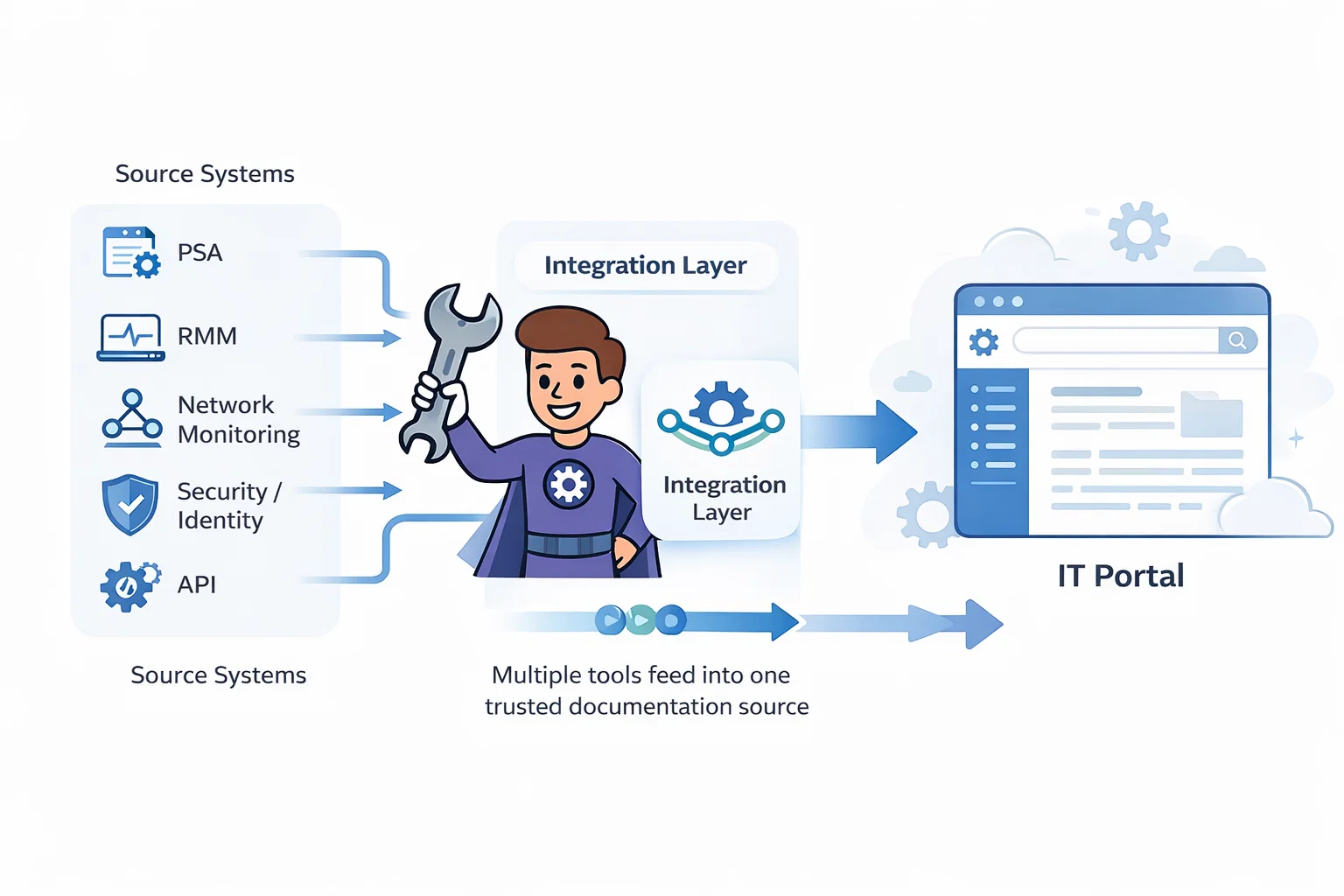
IT Portal's IT documentation integrations connect your PSAs, RMMs, authentication systems, and monitoring platforms into a unified system. Instead of ripping and replacing your stack, IT Portal works alongside the tools you already rely on - keeping your documentation accurate, current, and easy to trust.
What sets IT Portal apart: Our documentation-first approach automatically syncs data from your existing systems without requiring code or manual updates. Documentation stays in sync with reality, not outdated screenshots or forgotten notes.
PSA & RMM Integrations
What they do: Business management and remote monitoring platforms that power day-to-day MSP operations.
Popular platforms: ConnectWise, Autotask, HaloPSA, NinjaOne, Kaseya, Atera, SolarWinds, Datto RMM
Use case example: Sync operational and technical data—clients, assets, devices, tickets—directly into documentation. A technician using NinjaOne can auto-populate endpoint documentation without manual entry.
Key benefits:
- 40-60% reduction in manual data entry
- Fewer duplicate updates across systems
- Stronger alignment between operations and documentation
RMM Monitoring & Infrastructure Integrations
What they do: Infrastructure monitoring, networking platforms, and virtualization tools that track live system data.
Popular platforms: Domotz, Auvik, VMware vSphere, SolarWinds RMM, Cisco Meraki
Use case example: Map your network infrastructure via Auvik or document virtual machines through VMware—live data feeds directly into documentation, ensuring device inventories remain accurate.
Key benefits:
- 70–80% faster client onboarding with pre-populated data
- Always-current network and asset documentation
- Reduced configuration drift and compliance gaps
Authentication & Security Integrations
What they do: Identity providers, SSO platforms, and secure access systems that control user permissions.
Popular platforms: Active Directory, Microsoft 365, Azure AD, SAML, Cloudflare, Duo
Use case benefit: Automatic permission alignment and centralized access control simplify audits and improve security posture.
Key benefits:
- Compliance-ready documentation (SOC 2, HIPAA, ISO 27001)
- Reduced access risk and stronger audit trails
- User and group permissions always aligned with source systems
Integrate Seamlessly with Trusted Tools
IT Portal provides comprehensive IT documentation integrations designed to connect the tools MSPs already rely on. Each integration reduces manual work, keeps documentation accurate, and ensures your systems stay aligned as environments change—no coding required.
PSA & RMM Integrations
Connect service delivery, monitoring, and documentation into one operational view.








RMM Monitoring & Infrastructure
Ensure infrastructure documentation reflects what's actually deployed.


Datto Unified Continuity
Import Datto backup devices and link to remote management

Authentication & Security
Secure access, simplify audits, and enforce identity consistency.



Claude AI
Power AI Analysis Reports and the AI Content Editor across your documentation










Why Integrations Matter
Integrations aren't a convenience - they're a competitive advantage that transforms how IT teams work.
Data Consolidation
Replace fragmented data with a true single source of truth.
40–60% reduction in manual documentation effort
Real-Time Synchronization
Documentation updates automatically as environments change.
95%+ documentation accuracy
Operational Speed
Faster incident response, less platform switching, quicker onboarding.
70–80% faster technician onboarding
Security & Compliance
Centralized access control, audit logs, and compliance alignment.
SOC 2, HIPAA, ISO 27001 ready
Scalable Architecture
Add integrations as you grow, no replatforming required. IT Portal scales with your stack, not against it.
Implementation & Support
Pre-Built & Custom Integrations
Most integrations are pre-built and ready to deploy, no coding required.
For advanced needs, IT Portal offers a REST API for custom development.
Guided Onboarding Process
Our integration specialists guide you through every step:
Planning → Configuration → Testing → Deployment
- Standard integrations: 1–2 hours
- Complex environments: 1–2 days
Ongoing Maintenance
IT Portal actively maintains integrations with:
- Proactive monitoring
- Regular updates
- Platform compatibility checks
- 24/7 support available
Getting Help
- Knowledge Base (KB) articles
- Direct support access
- Dedicated integration specialists
- Community resources
Frequently Asked Questions
Typically, API credentials and read permissions are sufficient. IT Portal guides you through setup step-by-step.
PSA focuses on service delivery and billing, while ITSM centers on incident and change management. IT Portal integrates with both where applicable.
Automated synchronization ensures updates flow directly from source systems, eliminating stale or duplicated data.
IT Portal prioritizes authoritative sources and provides clear visibility into synchronization rules.
Best practice is importing only relevant and active data. Large imports are supported without performance impact.
Unify Your IT Documentation Without Replacing Your Stack
Your tools already work hard. Your documentation should too.
With IT Portal's IT Documentation Integration, you can finally connect your systems, eliminate silos, and trust your documentation again.
It's time to unify your IT documentation.
Explore More
- Integration Guides
- Case Studies
- Feature Overview
Need Help Choosing Integrations?
- Talk to Sales
- Contact Support
- Schedule a Consultation

