IT Document Template
IT Documentation Template That Eliminates Documentation Debt
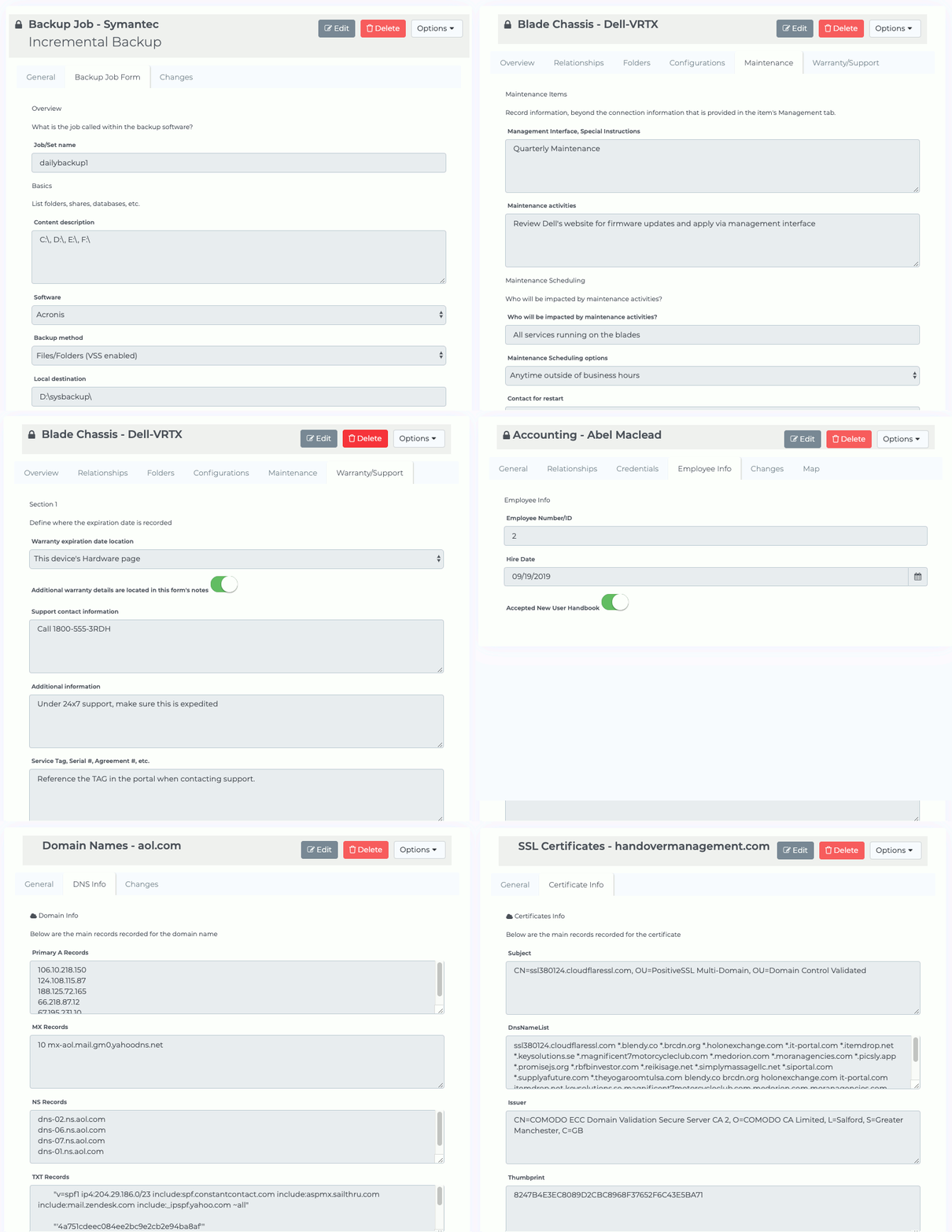
IT Portal's ready-to-use templates give you a single, hierarchical home for every piece of infrastructure data - network diagrams, asset details, credentials, SOPs, and change history. The result: no more missing configs, expired licenses, or audit surprises. Teams finish documentation faster, stay compliant, and spend far less time searching for answers.
Who IT Portal's Templates Are Designed For?
IT Portal's IT document template framework is built for environments where incomplete documentation creates real risk:
- MSPs standardising documentation across dozens of client environments.
- Internal IT teams outgrowing spreadsheets and shared drives.
- IT managers preparing for SOC 2, HIPAA, or ISO 27001 audits.
- New team leads inheriting undocumented infrastructure with zero knowledge transfer.
5 Core IT Document Template Types Every Team Needs
IT Portal organises documentation into five interconnected layers so nothing falls through the cracks.
-
01
Network & Infrastructure Template
Maps physical topology (racks, cabling, locations) and logical topology (IP schemes, VLANs, subnets, firewall rules). The built-in network import automatically populates the template from your live environment, so you start with accurate data instead of a blank page.
-
02
Asset & Software Inventory Template
Captures hardware (make, model, serial, warranty) and software (version, license count, renewal date). Device documentation captures every asset at the field level ensuring your inventory template reflects what is actually deployed, not what was last manually entered. A complete IT documentation template for assets should also surface expiration alerts automatically, so no license renews unnoticed, expires untracked, or creates a compliance gap at audit time.
-
03
Credentials & Access Template
Stores logins, MFA settings, and roles, encrypted and linked to the exact device or service with built-in password management. No more separate password spreadsheets, everything lives inside the same secure, searchable template your team already uses.
-
04
SOP & Runbook Template
Standardizes the steps your team follows for recurring tasks and incident response. When a critical system goes down at 2am, a completed runbook template is the difference between a 20-minute fix and a 3-hour war room. For teams operating under SOC 2, HIPAA, or ISO 27001, documented SOPs also directly support regulatory compliance requirements that auditors look for first.
-
05
Change Management Template
Automatically records who changed what, when, and why across every template. The audit trail builds itself, no manual logs required, so compliance reviewers see a complete history at a glance.
How to Use IT Portal's Documentation Templates - Step by Step
-
01
Step 1: Discovery First
Run a network scan or quick walkthrough to record what actually exists before filling any template.
-
02
Step 2: Populate in Layers
Begin with network and assets, then add configurations and credentials. Assign a named owner to each section so accountability is clear from day one.
-
03
Step 3: Event-Based Updates
Update the template whenever a device is added, a config changes, staff leaves, or a client is onboarded. Event triggers keep everything current without forcing calendar reviews.
IT Document Template for MSPs: One Framework, Every Client
MSPs need consistency at scale. With IT Portal, the template structure is identical across every client while the data inside each instance stays unique.
Standardize Across Every Client - Without Losing Flexibility
The IT document template structure should be identical across all clients. The content inside each instance will differ, but the framework - sections, fields, naming conventions - must stay consistent. This is what allows any technician on your team to pick up any client account and operate confidently from day one.
Templates as the Foundation of MSP Client Onboarding
A strong IT document template doubles as your client onboarding checklist. When a new client is added, completing the template is the onboarding process - every section filled represents infrastructure understood, documented, and ready to support at full capacity.
Common IT Document Template Mistakes to Avoid
Even teams using a structured IT document template make documentation errors that quietly undermine its value over time.
- Treating it as a one-time project. Infrastructure changes daily; your IT documentation template must follow.
- Storing credentials outside the template. Passwords in separate spreadsheets or sticky notes break the entire system.
- No named ownership. A template without a named maintainer becomes outdated within weeks.
- Over-documenting everything at once. Start with highest-risk, highest-use sections and build outward.
- Skipping the change history layer. Knowing the current state is useful; knowing how it got there is essential.
An IT document template is not a form to complete once and file away. It is the operating system behind a well-run IT environment. When every device, configuration, credential, and procedure has a structured and searchable home, your team spends less time hunting for information and more time delivering results. Build your system around the right IT document template from day one.
Ready to Close Your Documentation Gaps for Good?
Book a free demo and see how a structured IT document template works across real IT environments.

